Buying Guide

Best Laptops with an RTX 4050
2026 Edition · 8 Picks Ranked

The RTX 4050 is still the cheapest way into DLSS 3 Frame Generation and ray tracing. Eight laptops compared on the specs that actually decide frame rate — GPU wattage, CPU class, panel brightness and cooling — from a ₹77,990 Victus to a 2.5K Alienware.

Nopturnia Editorial
9 min read Global 8 picks
Best RTX 4050 gaming laptops 2026 — eight machines compared and ranked

Overview

The entry point to Ada, and still the smart 1080p buy

The GeForce RTX 4050 sits at the bottom of NVIDIA's Ada laptop stack, but it is the cheapest place to get the whole feature set: DLSS 3 with Frame Generation, fourth-generation Tensor cores, third-generation RT cores and hardware AV1 encoding. At 1080p — which is what every laptop in this guide ships — that combination is what keeps it comfortably above 60fps in current titles, long after its raw shader count stopped looking impressive.

The catch is that “RTX 4050 6GB” on a spec sheet tells you far less than it appears to. The same GPU ships anywhere from 45W to 115W depending on the chassis it lands in, and that spread is worth 25–30% in frame rate. We have ranked these eight machines on the things that vary — sustained GPU wattage, CPU class, panel brightness and refresh, memory configuration and cooling — across three price tiers, from the ₹77,990 HP Victus to the ₹1,31,490 Alienware 16 Aurora. If your budget stretches further, our guide to the best gaming laptops covers the RTX 4060 through 4090 tier.

Our Method

How we test & rank RTX 4050 laptops

Every laptop here is scored on the five factors that decide real-world gaming performance: sustained GPU wattage (TGP, in watts), CPU class — H-series versus desktop-derived HX, display quality (refresh rate in Hz, brightness in nits, sRGB coverage), memory configuration (DDR4 or DDR5, single or dual-channel), and cooling and acoustics under a sustained load. We weight the numbers you live with — frame rate after twenty minutes, not in the first ninety seconds — over peak boost figures on a datasheet.

Our rankings combine hands-on impressions, manufacturer specifications and thousands of verified owner reviews across marketplaces. Prices and availability are rechecked at each update, and every price shown here is indicative and verified at publication — laptop pricing moves fast during sale events. Nopturnia earns an affiliate commission on qualifying purchases, but that never changes where a machine lands in these rankings.

Side-by-side

RTX 4050 Laptop Comparison 2026

Scroll right on smaller screens to see all columns.

Model Price CPU Display Memory Rating Buy
HP Victus 15
HP Victus 15
Best Budget
₹77,990 Core i5-13420H15.6" FHD 144Hz16GB DDR4 4.3 Amazon
ASUS Gaming V16
ASUS Gaming V16
Best 16-inch Value
₹84,990 Intel Core 5 210H16" FHD+ 144Hz16GB / 512GB 4.4 Amazon
Acer Aspire 7
Acer Aspire 7
Best for Study + Play
₹90,800 Intel Core 5 210H15.6" FHD16GB DDR4 4.2 Amazon
HP Victus Ryzen 7
HP Victus Ryzen 7
Best AMD Pick
₹99,990 Ryzen 7 7445HS15.6" FHD 144Hz16GB DDR5-5600 4.4 Amazon
MSI Katana A15 AI
MSI Katana A15 AI
Best for Creators
₹99,990 Ryzen 7 8840HS15.6" FHD 144Hz16GB / 512GB 4.4 Amazon
Lenovo LOQ 2024
Lenovo LOQ 2024
Best Overall
₹1,07,490 Core i5-13450HX15.6" 144Hz 300 nits16GB DDR5-4800 4.6 Amazon
Acer Nitro V 15
Acer Nitro V 15
Best Display
₹1,09,990 Core i7-13620H15.6" 165Hz 300 nits16GB DDR5 4.5 Amazon
Alienware 16 Aurora
Alienware 16 Aurora
Best Premium
₹1,31,490 Intel Core 5 210H16" WQXGA 300 nits2 × 8GB DDR5 4.5 Amazon

In-Depth Reviews

RTX 4050 Laptop Reviews — All 8 Picks

Click Amazon to buy at the listed price.

Best Budget 01 / 08
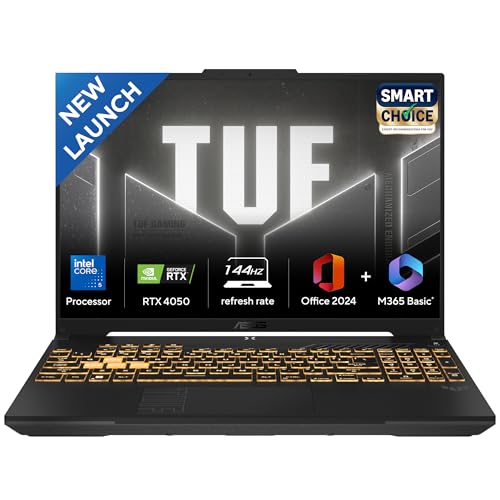
HP Victus 15 (i5-13420H) gaming laptop with NVIDIA GeForce RTX 4050 HP

HP Victus 15 (i5-13420H)

4.3 / 5 ₹77,990

The cheapest way onto the RTX 4050 ladder, and still a complete gaming machine. The 8-core i5-13420H pairs 12 threads with a 12MB L3 cache, and HP's enhanced-cooling chassis keeps the 6GB RTX 4050 fed long enough to hold 60fps at 1080p high in almost everything current. DDR4 rather than DDR5 memory is the concession you make for the price.

CPUCore i5-13420H
GPURTX 4050 6GB
Display15.6" FHD 144Hz
Memory16GB DDR4 / 512GB
  • 8-core / 12-thread i5-13420H with an updated dual-fan cooling design
  • 144Hz IPS panel — enough motion clarity for competitive shooters
  • Ships with Windows 11 and Office 2021 preloaded, backlit keyboard included
Best 16-inch Value 02 / 08
ASUS Gaming V16 (2025) gaming laptop with NVIDIA GeForce RTX 4050 ASUS

ASUS Gaming V16 (2025)

4.4 / 5 ₹84,990

The value pick if you want screen area rather than raw clock speed. The 16-inch 16:10 panel runs 1920×1200 at 144Hz and 300 nits, so you get an extra strip of vertical space for browser tabs and timelines without leaving the sub-₹90,000 bracket. At 1.95 kg it is also the lightest big-screen machine here.

CPUCore 5 210H
GPURTX 4050 6GB
Display16" FHD+ 144Hz
Weight1.95 kg
  • 16:10 FHD+ panel at 300 nits — brighter and taller than the usual 15.6" 16:9
  • Core 5 210H boosts to 4.8GHz across 8 cores / 12 threads
  • Backlit chiclet keyboard with a full number pad, 1.95 kg travel weight
Best for Study + Play 03 / 08
Acer Aspire 7 A715-79G gaming laptop with NVIDIA GeForce RTX 4050 Acer

Acer Aspire 7 A715-79G

4.2 / 5 ₹90,800

The Aspire 7 is the least aggressive-looking laptop in this guide, which is precisely the point. It hides a full 6GB RTX 4050 inside a 1.99 kg metal-lidded body that will not embarrass anyone in a lecture hall or a client meeting, and it ships with MS Office. Treat it as a productivity laptop that games hard rather than a gaming laptop you tolerate at work.

CPUCore 5 210H
GPURTX 4050 6GB
Display15.6" FHD
Weight1.99 kg
  • Understated 1.99 kg chassis — no RGB, no vents shouting for attention
  • Same Core 5 210H silicon as the gaming-branded machines at this price
  • Ships with MS Office, so nothing extra to buy on day one
Best AMD Pick 04 / 08
HP Victus 15 (Ryzen 7 7445HS) gaming laptop with NVIDIA GeForce RTX 4050 HP

HP Victus 15 (Ryzen 7 7445HS)

4.4 / 5 ₹99,990

The AMD Victus swaps DDR4 for a single 16GB stick of DDR5-5600 and adds the 300-nit anti-glare panel the cheaper Victus goes without — a real difference in a bright room. The Ryzen 7 7445HS runs 6 cores and 12 threads to 4.7GHz and tends to sit cooler than the Intel H-series parts under a long session.

CPURyzen 7 7445HS
GPURTX 4050 6GB
Display15.6" 144Hz 300 nits
Memory16GB DDR5-5600
  • 300-nit anti-glare IPS panel — the brightness floor for daytime play
  • DDR5-5600 in a single slot, so a second stick is a cheap later upgrade
  • DTS:X audio tuning and an included Xbox Game Pass trial
Best for Creators 05 / 08
MSI Katana A15 AI (Ryzen 7 8840HS) gaming laptop with NVIDIA GeForce RTX 4050 MSI

MSI Katana A15 AI (Ryzen 7 8840HS)

4.4 / 5 ₹99,990

The only laptop here with a dedicated NPU alongside the RTX 4050, courtesy of AMD's 8840HS. That matters if your workload includes local AI assistants, background-removal or transcription tools, because those tasks move off the GPU and leave more headroom for rendering. It also boosts to 5.1GHz, the highest clock in this roundup.

CPURyzen 7 8840HS
GPURTX 4050 6GB
Display15.6" FHD 144Hz
Weight2.25 kg
  • Ryzen 7 8840HS with built-in NPU — offloads AI tasks from the RTX 4050
  • 5.1GHz peak boost, the fastest single-core response of any pick here
  • MSI Center gives per-app fan and power profiles for quiet editing sessions
Best Overall 06 / 08
Lenovo LOQ 2024 (i5-13450HX) gaming laptop with NVIDIA GeForce RTX 4050 Lenovo

Lenovo LOQ 2024 (i5-13450HX)

4.6 / 5 ₹1,07,490

The LOQ is the one machine here built on a desktop-derived HX chip: the i5-13450HX brings 10 cores, 16 threads and a 20MB cache, which is a different class of CPU from the H-series parts below it. Lenovo also gives it the best panel in the mid tier — 300 nits at 100% sRGB — and a cooling system sized for a much hotter GPU, so the RTX 4050 rarely throttles.

CPUCore i5-13450HX
GPURTX 4050 6GB
Display144Hz 100% sRGB
Memory16GB DDR5-4800
  • 10-core / 16-thread i5-13450HX — desktop-class HX silicon, not a mobile H part
  • 100% sRGB 300-nit panel, so colour work is actually viable on it
  • One year of Accidental Damage Protection included with the 83DV018JIN SKU
Best Display 07 / 08
Acer Nitro V 15 (i7-13620H) gaming laptop with NVIDIA GeForce RTX 4050 Acer

Acer Nitro V 15 (i7-13620H)

4.5 / 5 ₹1,09,990

The fastest panel in this guide at 165Hz, backed by the strongest H-series CPU: a 10-core i7-13620H with 24MB of cache boosting to 4.9GHz. Acer also leaves both M.2 slots accessible and lets the DDR5 go to 32GB, which makes this the most upgradeable machine of the eight.

CPUCore i7-13620H
GPURTX 4050 6GB
Display15.6" 165Hz 300 nits
Storage512GB, dual M.2
  • 165Hz IPS at 300 nits — the highest refresh rate in this roundup
  • Dual M.2 slots and 32GB DDR5 headroom for later expansion
  • i7-13620H: 10 cores and 24MB L3, a clear step above the i5 parts
Best Premium 08 / 08
Alienware 16 Aurora gaming laptop with NVIDIA GeForce RTX 4050 Alienware

Alienware 16 Aurora

4.5 / 5 ₹1,31,490

You are paying for the chassis, the 2.5K screen and the badge rather than for extra frames — the GPU is the same RTX 4050 as the ₹77,990 Victus. What you get is a genuinely premium 16-inch 16:10 WQXGA panel, dual-channel DDR5 out of the box, and Alienware's build quality. Run the 2.5K panel at 1080p for demanding titles and native for everything else.

CPUCore 5 210H
GPURTX 4050 6GB
Display16" WQXGA 2.5K
Memory16GB DDR5-5600
  • 16" 2.5K (2560×1600) WVA/IPS panel with ComfortView Plus low-blue-light
  • Dual-channel 2 × 8GB DDR5-5600 from the factory — the others ship single-channel
  • White backlit keyboard and Interstellar Indigo finish, 2.57 kg

Before You Buy

6 Things to Check

GPU wattage (TGP)

The single most important spec and the one most often hidden. Look for 95W or higher; below 60W you lose roughly a quarter of the performance you paid for. Larger chassis with dual fans consistently sustain more.

Display brightness & refresh

300 nits is the practical floor for daytime use, and 144Hz the floor for a gaming panel. 100% sRGB coverage matters if you edit photos or video. Refresh rate above 165Hz is wasted on a GPU in this class.

CPU class: H vs HX

H-series parts are mobile-first and efficient; HX parts are desktop dies with more cores and cache. HX helps in simulation, strategy and creative work — but at 1080p the GPU is usually the limit, so do not overpay.

Memory: DDR5 and dual-channel

16GB is the 2026 minimum. Prefer DDR5 over DDR4, and check whether it arrives as one stick or two — a single stick halves memory bandwidth and costs real frames. Confirm there is a free slot for later.

Cooling & sustained clocks

Peak boost numbers mean little after twenty minutes. Dual-fan designs with rear and side exhaust hold clocks far better than single-fan thin-and-lights, and they run quieter doing it. Weight above 2.1 kg is usually a good sign here, not a bad one.

Storage headroom

512GB is standard and fills after four or five modern installs. A second free M.2 slot is worth more than a factory 1TB drive, because a 2TB NVMe costs far less bought separately than as a configuration option.

Explained

Types of RTX 4050 laptops

The same GPU turns up in six quite different kinds of machine, and the differences between them matter more than the GPU name they share. Most RTX 4050 laptops are defined by three things: their chassis size and cooling budget, their CPU class, and the panel the manufacturer chose to pair with them. Here is how the main categories compare.

Budget 15.6-inch gaming laptops

The ₹75,000-₹90,000 core of the segment. Plastic chassis, 144Hz FHD panels, an H-series i5 or Ryzen 5, and DDR4 or single-channel DDR5. The RTX 4050 here typically runs 75-95W. Best value per rupee, and the reason this GPU still sells.

16-inch 16:10 machines

A taller 1920×1200 or 2560×1600 panel in a body only slightly larger. The extra vertical space is a genuine productivity gain, and the bigger chassis usually cools the GPU better. Expect a 200-400g weight penalty over a 15.6-inch.

HX-class performance laptops

Built around desktop-derived CPUs — the i5-13450HX and i7-13650HX in this guide. More cores, more cache and a heavier cooling system. Worth it for streaming, compiling, simulation and heavily modded games; largely wasted on pure 1080p esports.

Thin-and-light gaming laptops

Sub-2 kg designs that trade wattage for portability. The same RTX 4050 may run at 45-60W here, costing 20-30% performance against a chunky chassis. The right choice only if the laptop travels daily.

Creator-focused AI laptops

Machines pairing the RTX 4050 with an NPU-equipped CPU such as the Ryzen 7 8840HS. Local AI features — transcription, background removal, upscaling — run on the NPU instead of the GPU, leaving more headroom for the render or the game.

Premium-brand builds

Alienware, ROG and Legion chassis fitted with the entry GPU. You pay for aluminium, colour-accurate 2.5K panels, keyboards and support — not for frames. Sensible if the screen and build matter more to you than the benchmark.

Under the Hood

How the RTX 4050 actually works

The RTX 4050 is built on NVIDIA's Ada Lovelace architecture with 2,560 CUDA cores, 6GB of GDDR6 on a 96-bit bus, and dedicated hardware for ray tracing and machine learning. Knowing which of those parts is doing the work makes the spec sheets far easier to read — and explains why two laptops with identical GPUs can perform a tier apart.

TGP: why wattage beats core count

Laptop GPUs have a configurable Total Graphics Power, and manufacturers pick a figure that suits the chassis they are cooling. The RTX 4050 is specified anywhere from 45W to 115W, and the same silicon at 115W delivers roughly 25–30% more frames than at 60W. Vendors rarely print TGP on the retail listing, so use the chassis as a proxy: a 2.2–2.5 kg 15.6-inch or 16-inch body with two fans and rear exhaust is running the GPU near the top of the range; a 1.6 kg ultraportable is not.

DLSS 3 and Frame Generation

This is the RTX 4050's real advantage over last-generation hardware. DLSS Super Resolution renders the game at a lower internal resolution and reconstructs it with a neural network, while Frame Generation uses the Ada optical flow accelerator to synthesise entire intermediate frames. Combined, they routinely double the frame rate in supported titles. On an entry GPU that is the difference between 45fps and a locked 90fps, and it is why a 6GB card still handles 2026 releases.

VRAM: the 6GB ceiling

Six gigabytes on a 96-bit bus is the RTX 4050's genuine limitation. At 1080p with high (not ultra) textures, most current games stay inside it. Push to ultra textures, add ray tracing, or move to 1440p and you exceed the buffer — at which point the frame rate does not degrade gracefully, it stutters. Frame Generation also consumes a slice of VRAM, so the two constraints interact. This is the single strongest argument for stepping up to an 8GB RTX 4060 if you plan to keep the machine four years or more.

Cooling, thermal throttling and sustained clocks

Every laptop in this class boosts hard for the first few minutes and then settles. What it settles to depends on the heatpipe count, fan design and how the vendor splits power between CPU and GPU under a combined load. This is why a heavier chassis is often the better buy: an extra 300g of heatsink translates directly into higher sustained clocks, lower fan noise, and a machine that is still delivering its benchmark numbers in the second hour.

Our Recommendation

The best all-rounder is the
Lenovo LOQ 2024

If we had to pick just one: the Lenovo LOQ 2024 at ₹1,07,490 is the only machine here pairing the RTX 4050 with a desktop-derived HX processor, a 300-nit 100% sRGB panel and a cooling system sized for a much hotter GPU — so it holds its clocks where thinner rivals fade. But every laptop in this guide wins its own category:

  • Tightest budget: HP Victus 15 (i5-13420H) — a complete 144Hz RTX 4050 machine at ₹77,990
  • Best 16-inch value: ASUS Gaming V16 — 16:10 FHD+ at 300 nits, and only 1.95 kg
  • Best AMD option: HP Victus (Ryzen 7 7445HS) — DDR5-5600 and a 300-nit anti-glare panel
  • Best for creators: MSI Katana A15 AI — an NPU beside the GPU, boosting to 5.1GHz
  • Best panel and upgradeability: Acer Nitro V 15 — 165Hz, dual M.2, 32GB DDR5 headroom
  • Best premium build: Alienware 16 Aurora — 2.5K 16:10 WQXGA and dual-channel DDR5
Buy Our Pick on Amazon

FAQ

Frequently Asked Questions

Yes, if you play at 1080p. The RTX 4050 remains the cheapest laptop GPU with the full Ada feature set — DLSS 3 Frame Generation, fourth-gen Tensor cores and hardware AV1 encoding — and that combination is what keeps it viable. With DLSS Quality plus Frame Generation it holds comfortably above 60fps at 1080p high in current titles. What it is not is a 1440p card: 6GB of VRAM is the limiting factor long before the shader count is.
A great deal — more than the CPU on the spec sheet. The RTX 4050 ships anywhere between 45W and 115W depending on the chassis, and the gap between the two ends is roughly 25-30% in frame rate on the same silicon. Two laptops can both say "RTX 4050 6GB" and perform a tier apart. Larger 15.6-inch and 16-inch bodies with dual fans, like the LOQ and the Victus, run the GPU nearer the top of that range than thin-and-light designs do.
For 1080p, yes for now. Most current games stay under 6GB at 1080p high with textures set to high rather than ultra. You will hit the ceiling if you push ray tracing plus ultra textures, run at 1440p, or use heavy texture mod packs. If any of those describe you, an RTX 4060 with 8GB is the sensible next step up rather than a faster CPU.
The screen, in almost every case. An HX-class chip like the i5-13450HX helps in simulation, strategy and compile-heavy work, but at 1080p the RTX 4050 is the bottleneck in most games regardless of which CPU sits beside it. A 300-nit 144Hz panel, on the other hand, is something you look at for every hour you own the machine — and a 250-nit screen is genuinely hard to use in a bright room.
16GB of RAM is the floor in 2026 and every laptop in this guide meets it. Prefer DDR5 over DDR4 where the price is close, and check whether the 16GB arrives as one stick or two — single-channel costs you real frames, which is why the Alienware's 2 × 8GB configuration is worth noting. On storage, 512GB fills up after four or five modern installs, so buy a machine with a free second M.2 slot if you can.
No, and no gaming laptop does. Away from the wall the GPU is power-limited hard and you should expect roughly a third of the plugged-in frame rate, with battery life measured in one to two hours. Treat the battery as enough runway for browsing, note-taking and video between sessions, and plan to game plugged in.
Take the 4050. Raw rasterisation between the two is close, and the 3060's 6GB matches it, but the RTX 4050 adds DLSS 3 Frame Generation, far better ray-tracing performance per watt and AV1 encoding for streaming. It also runs cooler and quieter at the same performance level, which matters in a thin laptop chassis.
The RAM and SSD, usually yes; the GPU, never — it is soldered to the board. Most of these machines expose at least one free SO-DIMM slot and a second M.2 bay, with the Acer Nitro V 15 the most generous at 32GB of DDR5 headroom and dual M.2. Check the service manual for your exact SKU before buying, because single-slot configurations do exist in this price band.
The 4060 adds 8GB of VRAM against the 4050's 6GB, more CUDA cores, and a wider memory bus, which works out to roughly 20-25% more performance at the same wattage. If your budget stretches past the top of this guide and you intend to keep the laptop four years or more, the extra VRAM is the more durable purchase. Below ₹1,00,000, the RTX 4050 is still the better value.