Buying Guide

Best RTX 5060 Gaming Laptops
2026 · Ranked by Real GPU Power, Not the Badge

Every laptop here says “RTX 5060”, and they are up to 30% apart. The number that decides it is TGP — the wattage the chassis lets the GPU draw — and almost nobody prints it. Eight machines from ₹1,29,990 to ₹2,18,490, ranked on power, panel and cooling rather than on the sticker.

Nopturnia Editorial
22 min read India 8 picks
Best RTX 5060 gaming laptops in India 2026 — eight machines compared on GPU TGP, display and cooling

Overview

One GPU name, a 30% performance spread

Nvidia’s RTX 5060 laptop GPU is the volume seller of the Blackwell generation in India, and it is also the most misleading badge on a spec sheet. The chip itself is identical everywhere — the same die, the same 8GB of GDDR7 on a 128-bit bus. What is not identical is the power budget each manufacturer gives it. Laptop makers can configure the 5060 anywhere from roughly 45W to 115W, and that one number is worth 25–30% of your frame rate. Two machines advertising “RTX 5060” can be a quarter apart in real performance, and nothing on the product page is obliged to tell you.

That is the problem this guide exists to solve. Of the eight laptops here, only three publish a real GPU figure — the ASUS TUF F16 and ROG Strix G16 at 115W, and the Alienware 16 Aurora at 80W — and we have ranked accordingly, weighting disclosed power, panel quality and cooling headroom above the CPU model number that marketing leads with. Watch for the lookalike number while you shop: Lenovo prints “TDP up to 125W”, “170W” and “200W” on the LOQ, Legion 5 and Legion Pro 5 respectively, but those are combined CPU-plus-GPU platform figures, not GPU TGP — Nvidia caps this GPU at 115W, so a bigger number there does not mean a faster graphics card. Prices run from ₹1,29,990 to ₹2,18,490, all read from the live Amazon.in listing on the day of publication. If this bracket is above your budget, the same logic applies one tier down in our guide to RTX 4050 gaming laptops.

One thing to settle before you spend: 8GB of VRAM is the real ceiling on all of these. It is enough for 1080p at high settings in essentially everything, and enough for 1440p with DLSS doing the work, but it is not a buy that will still feel generous in 2029. If you are choosing between more system memory and a faster processor, take the memory — when textures overflow 8GB they spill into system RAM, and 24GB or 32GB makes that far less painful than 16GB does.

Side-by-side

RTX 5060 Gaming Laptop Comparison 2026

Scroll right on smaller screens to see all columns.

Laptop Price CPU GPU TGP Display RAM / SSD Rating Buy
HP Victus 15
HP Victus 15
Best Value
₹1,29,990 i7-13620HNot disclosed15.6" FHD 144Hz24GB / 1TB 4.4 Amazon
ASUS TUF F16
ASUS TUF F16
Best Overall
₹1,49,990 i7-14650HX115W16" FHD+ 165Hz16GB / 1TB 4.5 Amazon
Alienware 16 Aurora
Alienware 16 Aurora
Best Design
₹1,56,555 Core 7 240H80W16" WQXGA 120Hz16GB / 1TB 4.3 Amazon
Lenovo LOQ 15
Lenovo LOQ 15
Most CPU per Rupee
₹1,58,990 i7-14700HXNot disclosed15.6" FHD 144Hz16GB / 1TB 4.4 Amazon
HP Omen 16
HP Omen 16
Best Screen Under ₹1.7L
₹1,66,990 Core Ultra 7 255HNot disclosed16" WUXGA 165Hz24GB / 1TB 4.5 Amazon
Lenovo Legion 5
Lenovo Legion 5
Best All-Rounder
₹1,79,990 i7-13650HXNot disclosed15.3" WUXGA 165Hz16GB / 1TB 4.5 Amazon
ASUS ROG Strix G16
ASUS ROG Strix G16
Best Performance
₹2,00,042 Core Ultra 9 275HX115W16" QHD+ 240Hz16GB / 1TB 4.6 Amazon
Lenovo Legion Pro 5
Lenovo Legion Pro 5
Best OLED
₹2,18,490 Core Ultra 7 255HXNot disclosed16" WQXGA OLED 165Hz32GB / 1TB 4.7 Amazon

On the TGP column: only ASUS and Dell publish a graphics-power figure for these machines. Lenovo advertises “TDP up to 125W” (LOQ 15), “170W” (Legion 5) and “200W” (Legion Pro 5), but those describe combined CPU-plus-GPU platform power, not the GPU’s TGP — Nvidia caps the laptop RTX 5060 at 115W, so they are not comparable with the 80W and 115W figures above.

In-Depth Reviews

RTX 5060 Laptop Reviews — All 8 Picks

Click Amazon to buy at the listed price.

Best Value 01 / 8
HP Smartchoice Victus 15 gaming laptop with RTX 5060 and 24GB DDR5 HP

HP Smartchoice Victus 15 (i7-13620H, RTX 5060)

4.4 / 5 ₹1,29,990

The cheapest way onto Blackwell silicon in India, and the only laptop here that pairs an RTX 5060 with 24GB of DDR5 out of the box. That memory allocation matters more than it looks: with only 8GB of VRAM on the GPU, games that overflow their texture budget spill into system RAM, and 24GB softens the landing in a way 16GB does not. The compromise is the panel — 300 nits and 62.5% sRGB is the dimmest, flattest screen in this guide, fine in a dark room and washed out anywhere else.

CPUCore i7-13620H (10C/16T)
GPURTX 5060 8GB GDDR7
Display15.6" FHD 144Hz
Memory24GB DDR5 / 1TB
  • 24GB arrives as a single DDR5-5600 module, so the second slot stays free — the only pick here you can expand without discarding a stick
  • HP publishes no TGP figure for this chassis; expect the lower half of the 5060 range, which makes 1080p the sensible target rather than 1440p
  • At 2.29kg with a 15.6in footprint it is the most backpack-friendly machine under ₹1.5 lakh here
Best Overall 02 / 8
ASUS TUF Gaming F16 laptop with RTX 5060 and 165Hz 16-inch display ASUS

ASUS TUF Gaming F16 (i7-14650HX, RTX 5060)

4.5 / 5 ₹1,49,990

The one we would spend our own money on, and the single best-value machine in this guide once you read the fine print: ASUS runs the RTX 5060 here at a disclosed 115W TGP — the same ceiling as the ROG Strix G16 that costs ₹50,052 more. The ₹20,000 over the Victus additionally buys a 16in 16:10 panel at 1920×1200 and 165Hz, a 16-core i7-14650HX that holds its clocks under sustained load, and a 90Whr battery, the largest here. TUF chassis are built to a MIL-STD-810H drop and vibration spec and have the best spare-parts availability of any gaming line in India.

CPUCore i7-14650HX (16C/24T)
GPURTX 5060 8GB — 115W TGP
Display16" FHD+ 165Hz
Memory16GB DDR5 / 1TB
  • A full 115W TGP (100W sustained plus 15W Dynamic Boost) for ₹1,49,990 — the cheapest way to get an RTX 5060 running at its maximum power in India
  • The 16:10 panel carries roughly 11% more vertical pixels than the 15.6in 16:9 screens here — obvious in everything that is not a game
  • Ships with 16GB in one module and a free slot, so a second stick is the cheapest meaningful upgrade this machine will ever take
Best Design 03 / 8
Alienware 16 Aurora gaming laptop with RTX 5060 and WQXGA display Alienware

Alienware 16 Aurora (Core 7 240H, RTX 5060 80W)

4.3 / 5 ₹1,56,555

One of only three laptops here where the manufacturer publishes the GPU’s power budget — 80W — and that transparency is worth rewarding, because it is the single number separating a fast RTX 5060 from a slow one. You also get a 2560×1600 WQXGA panel, which nothing else under ₹1.6 lakh offers, plus Alienware’s Cryo Chamber cooling. The trade-offs are real: 120Hz caps the panel below the 165Hz standard here, and 2.57kg makes it the heaviest machine on the list.

CPUIntel Core 7 240H (10C)
GPURTX 5060 8GB — 80W TGP
Display16" WQXGA 120Hz
Memory16GB DDR5 / 1TB
  • A disclosed 80W TGP means you know what you are buying rather than inferring it from how thick the chassis looks
  • 16GB ships as 2×8GB in dual channel — faster today than the single-stick rivals, but both slots are full so expanding means replacing
  • 120Hz suits single-player and creative work; competitive shooter players should take the Strix G16 or a Legion instead
Most CPU per Rupee 04 / 8
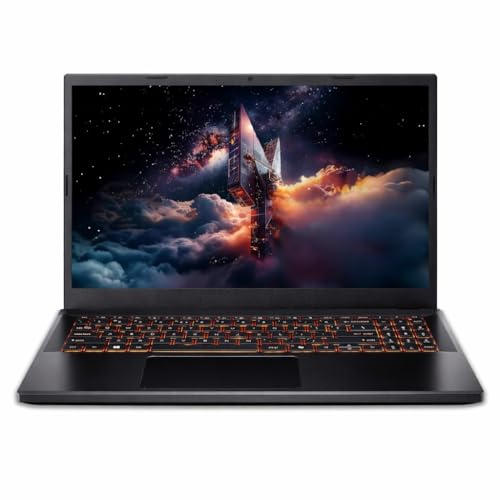
Lenovo LOQ 15 gaming laptop with Core i7-14700HX and RTX 5060 Lenovo

Lenovo LOQ 15 (i7-14700HX, RTX 5060)

4.4 / 5 ₹1,58,990

Twenty cores and twenty-eight threads for under ₹1.6 lakh is the most raw CPU throughput per rupee anywhere in this guide — the i7-14700HX sits a clear tier above every other chip here bar the Strix’s Ultra 9. If you compile, render or stream alongside gaming, this is the machine. Lenovo also fits a 100% sRGB panel, which is a materially better screen than the Victus’s despite sharing the same 144Hz and 300-nit numbers.

CPUCore i7-14700HX (20C/28T)
GPURTX 5060 8GB GDDR7
Display15.6" FHD 144Hz, 100% sRGB
Memory16GB DDR5 / 1TB
  • Two DDR5-5600 SO-DIMM slots with one left free, officially rated to 32GB total
  • 100% sRGB coverage at this price — the Victus manages 62.5%, and the two are obviously different side by side
  • A 20-core HX processor inside a 15.6in shell runs hot; expect audible fans whenever CPU and GPU load together
Best Screen Under ₹1.7L 05 / 8
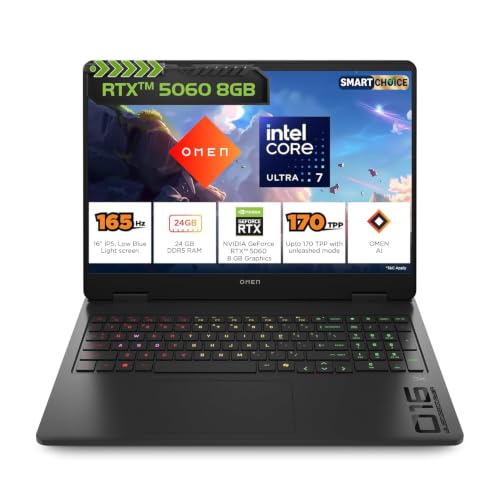
HP Omen 16 gaming laptop with Core Ultra 7 255H, RTX 5060 and 165Hz display HP

HP Omen 16 (Core Ultra 7 255H, RTX 5060)

4.5 / 5 ₹1,66,990

The best panel available under ₹1.7 lakh: 16in, 1920×1200, 60–165Hz, 3ms, 400 nits and 100% sRGB. One correction to HP’s own listing — it is marketed as “2K WUXGA”, but 1920×1200 is WUXGA and is not 2K, so do not buy this expecting 1440p. The Core Ultra 7 255H is a 16-core Arrow Lake part that trades a little peak multi-core throughput for considerably better efficiency than the 14th-gen HX chips, and the 24GB of DDR5 gives it the same VRAM-spill cushion as the Victus.

CPUCore Ultra 7 255H (16C)
GPURTX 5060 8GB GDDR7
Display16" WUXGA 165Hz, 400 nits
Memory24GB DDR5 / 1TB
  • 400 nits with full sRGB coverage makes it the only sub-₹1.7L machine here that stays readable next to a window
  • Arrow Lake-H draws less power at light load than the i7-14650HX, so browsing and idle runtime beat the TUF despite a smaller battery
  • Variable 60–165Hz refresh at a 3ms response — the panel is never the limiting factor at any setting the 5060 can drive
Best All-Rounder 06 / 8
Lenovo Legion 5 2025 gaming laptop with RTX 5060 and 165Hz WUXGA display Lenovo

Lenovo Legion 5 2025 (i7-13650HX, RTX 5060)

4.5 / 5 ₹1,79,990

Legion cooling has set the benchmark in this class for three generations, and the 2025 model is the most complete machine here below ₹2 lakh: a 165Hz WUXGA panel at 100% sRGB with Dolby Vision and 300 nits, in a 2.1kg body — the lightest in this guide by a clear margin. Note a contradiction in the listing itself: the model name says 15.3in (38.8cm) while the spec block says 16in. Treat it as a 15.3in machine, since that is what the part number describes.

CPUCore i7-13650HX (14C/20T)
GPURTX 5060 8GB GDDR7
Display15.3" WUXGA 165Hz, Dolby Vision
Memory16GB DDR5 / 1TB
  • 2.1kg is 300–470g lighter than everything else here — the difference between a laptop you carry and one that lives on a desk
  • Dolby Vision alongside 100% sRGB makes it the best of these for watching film as well as playing games
  • The i7-13650HX is the oldest CPU in this price bracket; what you are paying for is the chassis and the thermals, not the processor
Best Performance 07 / 8
ASUS ROG Strix G16 gaming laptop with 115W RTX 5060 and 240Hz QHD+ display ASUS

ASUS ROG Strix G16 (Core Ultra 9 275HX, RTX 5060 115W)

4.6 / 5 ₹2,00,042

The fastest machine on this list, though the margin is narrower than the price gap suggests. ASUS runs the GPU at a disclosed 115W TGP — about 44% more power than the 80W Alienware — and pairs it with a 24-core Core Ultra 9 275HX and a 2560×1600 240Hz panel, which makes this the only laptop here genuinely built for competitive 1440p. Be clear about what the extra ₹50,052 over the TUF F16 buys, though: the same 115W GPU, a much stronger CPU and a far better screen. Sixteen gigabytes of RAM at ₹2 lakh remains the one mean specification.

CPUCore Ultra 9 275HX (24C)
GPURTX 5060 8GB — 115W TGP
Display16" QHD+ 240Hz
Memory16GB DDR5 / 1TB
  • 115W is the maximum TGP any RTX 5060 laptop ships with — but the TUF F16 matches it for ₹50,052 less, so what you are paying for here is the Ultra 9 CPU and the 240Hz QHD+ panel, not extra GPU power
  • 240Hz at 2560×1600 needs DLSS 4 frame generation to feed it — native 1440p in heavy titles lands well below the panel ceiling
  • 90Whr battery and a 4-zone RGB keyboard, but at over 2kg plus a large adapter this is a desk machine that occasionally travels
Best OLED 08 / 8
Lenovo Legion Pro 5 2025 gaming laptop with RTX 5060 and WQXGA OLED display Lenovo

Lenovo Legion Pro 5 2025 (Core Ultra 7 255HX, RTX 5060)

4.7 / 5 ₹2,18,490

The only OLED in this guide, and the specification that justifies the price: 2560×1600 at 165Hz, 500 nits, 100% DCI-P3, DisplayHDR True Black 1000 and G-SYNC. Blacks are genuinely black rather than dark grey, which changes how every night-time or underground scene looks. Lenovo also ships 32GB of DDR5 as 2×16GB in dual channel — double everything else here, and the correct answer to an 8GB VRAM budget.

CPUCore Ultra 7 255HX (20C)
GPURTX 5060 8GB GDDR7
Display16" WQXGA OLED 165Hz, 500 nits
Memory32GB DDR5 / 1TB
  • DisplayHDR True Black 1000 with per-pixel dimming — the only panel here where switching HDR on is worth doing
  • 32GB in dual channel from the factory: no upgrade required, and the VRAM spill cushion is twice as deep as on the 16GB machines
  • G-SYNC removes tearing without a frame cap, which matters most in exactly the titles a 5060 cannot hold at a locked 165fps

Before You Buy

6 Things to Check

TGP — the number that decides everything

An RTX 5060 configured at 115W is roughly 25–30% faster than the same GPU at 45W, and manufacturers are not obliged to print the figure. Three picks here disclose a real GPU figure: 115W on the ASUS TUF F16 and ROG Strix G16, and 80W on the Alienware. Beware the lookalike number — Lenovo advertises “TDP up to 125W/170W/200W” on the LOQ, Legion 5 and Legion Pro 5, but that is combined CPU-plus-GPU platform power, not GPU TGP. Nvidia caps the laptop RTX 5060 at 115W, so any figure above that is measuring something else entirely.

8GB of VRAM — plan around it, not past it

Every RTX 5060 laptop ships with 8GB of GDDR7 and no larger option exists. At 1080p high this is comfortable. At 1440p with ray tracing and ultra textures, several 2025–26 titles will exceed it and stutter regardless of how fast the GPU is. DLSS reduces the load because it renders at a lower internal resolution, so treat upscaling as part of the buying decision rather than a bonus feature.

Match resolution and refresh to the GPU

A 240Hz 1440p panel is wasted if the GPU only feeds it 90fps natively. Competitive players at 1080p should buy refresh rate; everyone else should buy resolution, colour coverage and brightness. Below 300 nits and 100% sRGB a screen is a compromise no matter how many hertz it runs at — the spread in this guide runs from 62.5% sRGB at 300 nits to 100% DCI-P3 at 500 nits.

RAM and storage headroom

Most of these ship 16GB in a single SO-DIMM with one slot free, which is the cheapest and most effective upgrade available to you. Check whether both slots are already populated — the Alienware’s 2×8GB is faster today but leaves nothing to add — and whether a second M.2 slot exists. Given the 8GB VRAM ceiling, the 24GB and 32GB configurations here earn their premium.

Cooling, noise and weight

Sustained performance is a thermal question, not a spec-sheet one. A 20-core HX processor in a 15.6in shell will be louder than the same chip in a 16in chassis with more radiator area. Weight across this guide runs from 2.1kg to 2.57kg, and the charger adds another 600–900g that nobody quotes in the listing.

Battery, adapter and service network

90Whr is the practical maximum and the largest pack here. Gaming unplugged still halves performance on every machine, so treat the battery as a specification for everything except gaming. Confirm the adapter wattage covers combined CPU and GPU draw, and check on-site warranty coverage in your own city before buying — service quality varies far more between these brands than the specifications do.

Explained

Types of RTX 5060 laptop

RTX 5060 laptops are not one product. The same GPU turns up in six meaningfully different classes of machine, and the chassis decides how much of that GPU you actually get to use — along with what you give up in screen, weight and price to get it.

15.6in FHD 144Hz — the budget tier (₹1.3–1.6L)

The volume category. 16:9 panels at 1920×1080, usually 300 nits, moderate TGP and a single populated RAM slot. Best value per rupee if 1080p is your target and you can live with a modest screen. The HP Victus 15 and Lenovo LOQ 15 both live here.

16in WUXGA 16:10 — the mainstream tier (₹1.5–1.8L)

1920×1200 at 165Hz. The extra vertical pixels and higher refresh cost ₹15,000–25,000 over the 15.6in class and are the single best-value upgrade in this market. The ASUS TUF F16 and HP Omen 16 are the examples in this guide.

16in QHD+ high-refresh (₹1.9L and up)

2560×1600 at 240Hz, paired with the highest TGP configurations and the strongest CPUs. Worth it only if you play competitively at 1440p and will actually use DLSS frame generation to reach the refresh ceiling. The ROG Strix G16 is this category.

OLED premium (₹2.1L and up)

Per-pixel dimming, genuine HDR and 100% DCI-P3 coverage. Transformative for dark-scene games and for video, and the panels now run 165Hz so there is no refresh penalty to pay. Expect to spend ₹30,000–40,000 over an equivalent IPS machine, as the Legion Pro 5 does.

Thin-and-light 14in (₹2L and up)

14in chassis with the 5060 configured low, typically 45–65W. You pay a premium for portability and give up performance for it. Sensible only when the laptop is a daily-carry machine first and a gaming machine second — ASUS’s TUF A14 and Zephyrus G14 are the Indian examples.

Desktop-replacement, high-TGP 16–18in

Thick chassis, vapour chamber cooling, 115W and above, and 90–100Whr batteries. Extracts everything the silicon has to give, at 2.5kg-plus and with a charger you will not enjoy carrying. The ROG Strix G16 sits at the accessible end of this category.

Under the Hood

How the RTX 5060 laptop GPU works

Four things explain almost every difference between the machines on this page: the architecture, the memory, the power budget and the upscaler. Understanding them makes an RTX 5060 spec sheet readable and shows why two laptops with the same GPU name are not the same laptop.

Blackwell, and what changed from Ada

The RTX 5060 laptop GPU is built on Nvidia’s Blackwell architecture, successor to the Ada Lovelace design behind the RTX 40 series. The headline changes are fifth-generation Tensor cores with FP4 support, fourth-generation RT cores and a redesigned display engine. In raw raster performance the generational step over the RTX 4060 is modest — call it 10–20% depending on TGP — because the real gains are concentrated in AI-accelerated features rather than in brute force.

GDDR7 on a 128-bit bus

The 5060 pairs 8GB of GDDR7 with a 128-bit memory interface. GDDR7 uses PAM3 signalling in place of GDDR6’s NRZ, which lifts per-pin bandwidth substantially: the 5060 has roughly a third more memory bandwidth than the 4060 despite an identical bus width. What GDDR7 does not do is add capacity. Eight gigabytes is eight gigabytes, and the practical consequence is that this GPU is far more comfortable on bandwidth than it is on capacity.

TGP, Dynamic Boost, and why the same GPU differs

Total Graphics Power is the sustained wattage a laptop’s cooling and power delivery allow the GPU to draw. Nvidia specifies a range and each manufacturer picks a point inside it. Dynamic Boost then adds up to 25W more by shifting headroom across from the CPU whenever the CPU is idle enough to spare it, which is why GPU-bound games benefit from it and CPU-heavy ones do not. This is the whole reason a 115W Strix and a 45W thin-and-light running the same die land 30% apart, and why TGP deserves more weight in your decision than the processor model number does.

DLSS 4 and Multi Frame Generation

DLSS 4 is the reason a 5060 can drive a 240Hz 1440p panel at all. Super Resolution renders each frame at a lower internal resolution and reconstructs it, cutting both GPU load and VRAM use — which matters doubly here given the 8GB budget. Multi Frame Generation, exclusive to the RTX 50 series, then generates up to three additional frames for every rendered one using the transformer model on the Tensor cores, and the frame counter can roughly quadruple. What it does not do is reduce input latency: generated frames carry none of the responsiveness of real ones, so competitive players should use Super Resolution and leave frame generation switched off.

MUX switches and Advanced Optimus

By default a gaming laptop routes the discrete GPU’s output through the integrated graphics before it reaches the panel, which costs a few percent of performance. A MUX switch lets you bypass the iGPU and drive the display directly; Advanced Optimus does the same automatically and per-application, without the reboot older MUX implementations demanded. If a listing mentions either, it is a genuine feature worth having — and where a listing says nothing, assume the machine is running in the slower shared mode out of the box.

Our Method

How we test & rank gaming laptops

Every machine here is scored on five factors: GPU TGP in watts where the manufacturer discloses it, and cooling design as the proxy where they do not; display quality — resolution, refresh rate in Hz, brightness in nits and sRGB or DCI-P3 coverage weighed together, never refresh alone; CPU class, measured by core and thread count and by sustained rather than peak clocks; memory and storage headroom, including how many SO-DIMM and M.2 slots are left free for you; and thermals, acoustics and weight in kg, because a laptop that throttles or is too loud to sit beside is not fast in any way that matters. We weight TGP and display hardest, since those are the two specifications buyers most often get wrong.

Rankings combine hands-on time with these chassis families, manufacturer specification sheets and Nvidia’s own platform documentation, and verified owner reviews across Indian marketplaces. Prices are read from the live Amazon.in listing on the day of publication and rechecked at every update — gaming laptop pricing in India moves by several thousand rupees between sale events, so treat every figure here as indicative rather than fixed. Nopturnia earns an affiliate commission on qualifying purchases, but that has never changed where a machine lands in these rankings: our overall pick is the second cheapest of the eight.

Our Recommendation

The best buy for most people is the
ASUS TUF Gaming F16

At ₹1,49,990 it is the second cheapest laptop in this guide and the one we would buy with our own money — because it is the only machine here that runs the RTX 5060 at its full 115W TGP without charging ₹2 lakh for the privilege. The ROG Strix G16 has the same 115W GPU and costs ₹50,052 more; that premium buys a better CPU and a much better screen, but not one extra watt of graphics power. The ₹20,000 over the HP Victus, meanwhile, buys a 16in 16:10 panel at 165Hz instead of a 15.6in 144Hz one, a 16-core i7-14650HX, the largest battery here at 90Whr, and a chassis built to a MIL-STD-810H spec with the best spare-parts availability in the Indian market. Every other pick wins its own category:

  • Tightest budget: HP Smartchoice Victus 15 — ₹1,29,990, and the only sub-₹1.5L machine with 24GB of DDR5
  • Best raw performance: ASUS ROG Strix G16 — the same 115W TGP plus a 24-core Ultra 9 and a 240Hz QHD+ panel
  • Best screen under ₹1.7L: HP Omen 16 — 400 nits, 100% sRGB and 165Hz on a 16in 16:10 panel
  • Most CPU per rupee: Lenovo LOQ 15 — 20 cores and 28 threads for ₹1,58,990
  • Lightest, best cooled: Lenovo Legion 5 2025 — 2.1kg with three generations of Legion thermal work behind it
  • Best OLED: Lenovo Legion Pro 5 2025 — DisplayHDR True Black 1000 and 32GB of dual-channel DDR5
  • Best design and disclosed power: Alienware 16 Aurora — 80W TGP and a WQXGA panel for ₹1,56,555
Buy Our Pick on Amazon

FAQ

Frequently Asked Questions

Comfortably, yes — at 1080p. Every current AAA title runs above 60fps at high settings at 1920×1080 on a well-configured RTX 5060, and competitive titles such as Valorant and CS2 clear 200fps easily. At 1440p it needs DLSS to hold high frame rates in demanding games. Where it will age is VRAM: 8GB is adequate today and will become the constraint well before the GPU’s raw speed does.
Roughly 10–20% in raster performance at matched power, which is a modest generational step. The bigger differences sit elsewhere: GDDR7 delivers about a third more memory bandwidth, and DLSS 4 Multi Frame Generation is exclusive to the RTX 50 series and can multiply frame rates in supported titles. If you already own a 4060 laptop this is not an upgrade. If you are buying new, there is no reason to choose the older part.
It is enough for 1080p at high settings in essentially everything, and enough for 1440p when DLSS is doing the work, because upscaling lowers the internal render resolution and therefore lowers VRAM use. It is not enough for native 1440p with ultra textures and ray tracing in the heaviest 2025–26 releases, which will exceed it and stutter. There is no 12GB or 16GB version of the laptop RTX 5060, so plan around 8GB rather than hoping to avoid it — and buy more system RAM to soften the spill.
As high as the chassis you want will give you. Nvidia allows manufacturers to configure the 5060 from roughly 45W to 115W, and a 115W implementation is around 25–30% faster than a 45W one running identical silicon. Anything at or above 100W is a genuinely fast configuration, 80W is the mainstream point, and below 65W you are buying portability and paying for it in frames. Most listings do not print the figure; in this guide only the Alienware 16 Aurora (80W) and the ROG Strix G16 (115W) do.
Yes, with qualifications. At 2560×1440 or 2560×1600 the 5060 holds 60fps and above in most titles at high settings with DLSS Super Resolution enabled. Native 1440p at ultra settings with ray tracing is beyond it in the heaviest games, limited both by raw throughput and by the 8GB VRAM budget. If a 1440p panel is what you want, buy a machine with a high TGP — the gap between a 45W and a 115W 5060 widens as resolution rises.
The RTX 5070 laptop GPU is meaningfully faster and, more importantly, ships with 12GB of VRAM instead of 8GB — the specification most likely to limit an RTX 5060 machine across a four-year ownership period. It typically costs ₹30,000–50,000 more. If your budget stretches and you intend to play at 1440p, the 5070 is the better long-term buy. If you play at 1080p or the budget is fixed, a high-TGP 5060 spends the money better than a low-TGP 5070 does.
16GB is the working minimum, and 24GB or 32GB is a genuinely good use of money on these machines specifically, because the 8GB VRAM ceiling means textures spill into system memory more often than they would on a 12GB or 16GB GPU. Three picks in this guide ship above 16GB: the HP Victus and HP Omen at 24GB, and the Legion Pro 5 at 32GB. Most of the rest leave a SO-DIMM slot free, which makes adding a second stick the cheapest worthwhile upgrade you can perform yourself.
No, and that is universal rather than a fault of any particular model. Unplugged, a gaming laptop restricts both CPU and GPU power to protect the battery and stay within what the pack can deliver — expect roughly half the frame rate, sometimes less. The 90Whr batteries in the TUF F16 and ROG Strix G16 give the longest general-use runtime here, but plan to game plugged in on every machine in this guide.
The difference between 144Hz and 165Hz is small — about 1.4 milliseconds per frame — and far less important than what else the panel does. Resolution, brightness in nits and colour coverage vary much more across these laptops than refresh rate does, and a 165Hz screen at 300 nits and 62.5% sRGB is a worse screen than a 144Hz one at 400 nits and 100% sRGB. Buy refresh rate only after brightness and colour are settled, unless you play competitively for money.

Every laptop we track, in one place

Live prices, discounts and 90-day price history across the full catalogue — search it, filter it by price and spec, and save what you're watching.

Browse all laptops