Buying Guide

Best Gaming Mouse
Budget to Pro · India 2026

From a ₹1,245 first gaming mouse to a 56g, 8,000 Hz Razer flagship — ten wired and wireless mice ranked across Logitech, Razer, Corsair, HyperX and Glorious, with a clear winner for FPS, MMO, budget and pure esports.

Nopturnia Editorial
9 min read India 10 picks
Best Gaming Mouse in India 2026 — budget to pro picks

Overview

The mouse is your aim — don't cheap out

In fast games, your mouse is your aim. A proper gaming mouse gives you a precise sensor that never spins out, a shape that fits your grip over long sessions, and switches that click cleanly for years. The last few years transformed the category: mice got dramatically lighter, wireless became genuinely lag-free, and prices fell — you can get a tournament-grade wireless mouse for under ₹2,500.

This guide ranks our top 10 picks across three bands: budget wired and wireless under ₹2,500, the lightweight and feature sweet spot from ₹3,000–₹6,000, and premium esports mice above that. Pair one with a good mechanical keyboard and monitor to complete the battlestation.

Our Method

How we test & rank gaming mice

Every mouse here is scored on the six factors that decide competitive feel: sensor accuracy (tracking, no spin-outs or smoothing), weight, shape and grip comfort, switch quality (crisp clicks, no double-click drift), wireless performance and battery where relevant, and software and value. We weight real in-game feel — a mouse you can flick and micro-adjust with confidence — over headline DPI numbers, which almost no one maxes out.

Our rankings combine hands-on impressions, manufacturer specifications, and thousands of verified owner reviews across marketplaces. We recheck pricing and availability at each update. Nopturnia earns an affiliate commission on qualifying purchases, but that never changes where a mouse lands in these rankings.

Side-by-side

Gaming Mouse Comparison 2026

Lower weight and honest sensor performance matter more than max DPI. Scroll right on small screens.

Mouse Price Weight Connection Max DPI Buttons Rating Buy
Logitech G102 Lightsync
Best Budget
₹1,245 85g Wired 8,000 6 4.5 Amazon
Corsair Katar Pro
Corsair Katar Pro
Best Budget FPS
₹1,399 96g Wired 12,400 6 4.4 Amazon
Razer Cobra
Razer Cobra
Best Lightweight Wired
₹2,299 58g Wired 8,500 6 4.5 Amazon
Logitech G304 Lightspeed
Best Budget Wireless
₹2,395 99g Wireless 12,000 6 4.6 Amazon
HyperX Pulsefire Haste 2 Wireless
Best Lightweight Wireless
₹3,690 61g Wireless 26,000 6 4.5 Amazon
Razer Basilisk V3
Razer Basilisk V3
Best for Customization
₹3,999 101g Wired 26,000 11 4.7 Amazon
Glorious Model O
Glorious Model O
Best Honeycomb Ultralight
₹5,999 67g Wired 12,000 6 4.5 Amazon
Logitech G Pro X Superlight
Best Premium Esports
₹7,995 63g Wireless 25,600 5 4.7 Amazon
Razer DeathAdder V3 Pro
Best Ergonomic Wireless
₹8,799 63g Wireless 30,000 5 4.7 Amazon
Razer DeathAdder V4 Pro
Best Flagship
₹15,999 56g Wireless 45,000 5 4.6 Amazon

Deep Reviews

The 10 Picks — Detailed

Click Amazon to check the latest price.

Best Budget 01 / 10
Logitech G102 Lightsync gaming mouse Logitech G

Logitech G102 Lightsync

4.5 / 5 ₹1,245

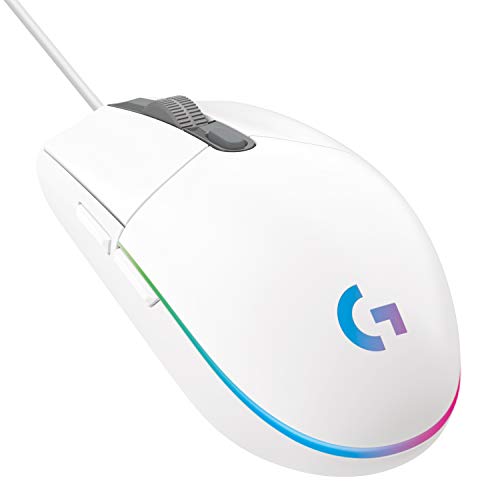
The default first gaming mouse in India, and for good reason. The G102 pairs a genuine gaming-grade sensor with LIGHTSYNC RGB, six programmable buttons and Logitech's rock-solid build for around ₹1,250. It won't win esports tournaments, but nothing else at this price feels as reliable or clicks as crisply.

Weight85g
ConnectionWired
Max DPI8,000
Buttons6
  • Gaming-grade sensor with up to 8,000 DPI
  • 6 programmable buttons + LIGHTSYNC RGB
  • Classic ambidextrous shape that suits any grip
  • Logitech build quality and warranty at a budget price
Best Budget FPS 02 / 10
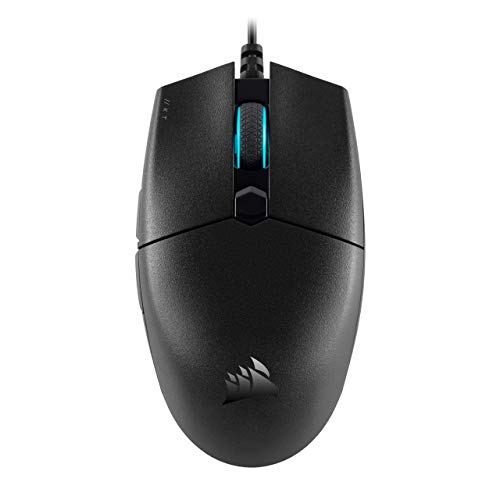
Corsair Katar Pro gaming mouse Corsair

Corsair Katar Pro

4.4 / 5 ₹1,399

A featherweight FPS pick on a budget. The Katar Pro keeps things simple — a light, symmetrical body, a precise 12,400 DPI optical sensor and Corsair's Quickstrike buttons with zero gap for instant clicks. If you play shooters and want speed over frills for under ₹1,500, this is the one.

Weight96g
ConnectionWired
Max DPI12,400
Buttons6
  • 12,400 DPI optical sensor tuned for FPS
  • Quickstrike buttons with zero click gap
  • Light, symmetrical shape for fast flicks
  • On-board DPI profiles via iCUE software
Best Lightweight Wired 03 / 10
Razer Cobra gaming mouse Razer

Razer Cobra

4.5 / 5 ₹2,299

Razer's cheapest way into the modern ultralight era. At just 58g the Cobra flicks effortlessly, yet keeps Razer's optical switches (no double-click drift), a flexible Speedflex cable and a surprising amount of underglow RGB. The best sub-₹2,500 wired mouse for competitive play.

Weight58g
ConnectionWired
Max DPI8,500
Buttons6
  • Just 58g for effortless flick shots
  • Gen-3 optical switches — no double-click issues
  • Flexible Speedflex cable feels near-wireless
  • Chroma RGB with a bright underglow
Best Budget Wireless 04 / 10
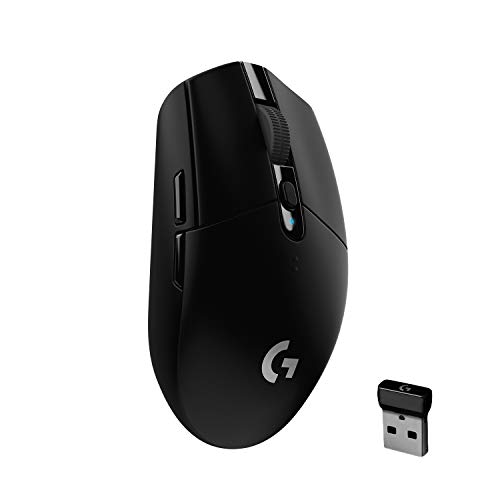
Logitech G304 Lightspeed gaming mouse Logitech G

Logitech G304 Lightspeed

4.6 / 5 ₹2,395

The value all-rounder, and our overall pick. The G304 brings Logitech's LIGHTSPEED wireless and the acclaimed HERO sensor — genuinely lag-free, tournament-grade performance — to a price that undercuts every rival. It runs for months on a single AA battery. Nothing else offers this much wireless mouse for the money.

Weight99g
ConnectionWireless
Max DPI12,000
Buttons6
  • LIGHTSPEED wireless with no perceptible lag
  • Acclaimed HERO sensor, up to 12,000 DPI
  • 250+ hours on a single AA battery
  • Light, pocketable and endlessly reliable
Best Lightweight Wireless 05 / 10
HyperX Pulsefire Haste 2 Wireless gaming mouse HyperX

HyperX Pulsefire Haste 2 Wireless

4.5 / 5 ₹3,690

A 61g wireless flyweight that punches far above its price. The Haste 2 Wireless drops the honeycomb for a solid shell, adds HyperX's own 26K sensor, dual 2.4GHz and Bluetooth, and a huge 100-hour battery. Grippy skates and TTC optical switches make it a superb value entry into serious wireless.

Weight61g
ConnectionWireless
Max DPI26,000
Buttons6
  • Ultralight 61g solid (non-honeycomb) shell
  • HyperX 26K sensor with 650 IPS tracking
  • Dual wireless: 2.4GHz + Bluetooth, ~100h battery
  • TTC gold optical switches rated for 100M clicks
Best for Customization 06 / 10
Razer Basilisk V3 gaming mouse Razer

Razer Basilisk V3

4.7 / 5 ₹3,999

The do-everything mouse for MMO, MOBA and productivity. The Basilisk V3 loads in 11 programmable buttons, a legendary tilt-scroll wheel with a free-spin smart-reel mode, and 11 zones of Chroma RGB. Its ergonomic shape and thumb rest suit long sessions — the most feature-packed mouse here by far.

Weight101g
ConnectionWired
Max DPI26,000
Buttons11
  • 11 programmable buttons for MMO and macros
  • Smart-reel tilt scroll wheel (ratchet or free-spin)
  • Focus+ 26,000 DPI optical sensor
  • Ergonomic shape with 11-zone Chroma RGB
Best Honeycomb Ultralight 07 / 10
Glorious Model O gaming mouse Glorious

Glorious Model O

4.5 / 5 ₹5,999

The mouse that started the honeycomb craze. The Model O's drilled shell drops it to 67g, its Ascended flexible cord feels wireless, and G-Skates and a proven sensor make it a cult favourite among FPS players. If you want the classic lightweight-with-holes design done right, this is the original and still one of the best.

Weight67g
ConnectionWired
Max DPI12,000
Buttons6
  • Honeycomb shell brings weight down to 67g
  • Ascended flexible cord mimics a wireless feel
  • Pixart 12,000 DPI sensor with clean tracking
  • G-Skate feet and vivid RGB — a cult classic
Best Premium Esports 08 / 10
Logitech G Pro X Superlight gaming mouse Logitech G

Logitech G Pro X Superlight

4.7 / 5 ₹7,995

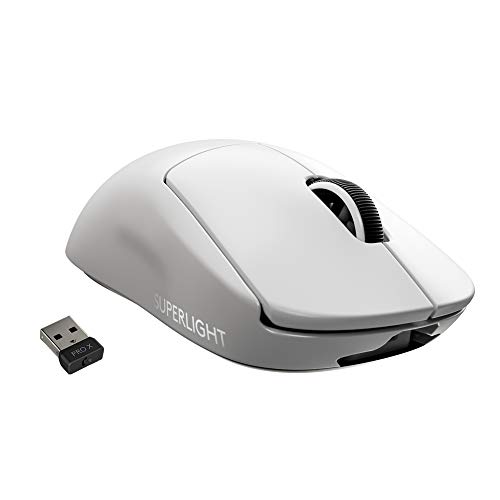
The mouse most pros actually use. The PRO X Superlight strips everything non-essential to hit 63g, runs Logitech's flawless LIGHTSPEED wireless and the HERO 25K sensor, and lasts 70 hours per charge. No RGB, no gimmicks — just the purest, most trusted competitive wireless mouse you can buy.

Weight63g
ConnectionWireless
Max DPI25,600
Buttons5
  • Ultralight 63g with zero-compromise build
  • LIGHTSPEED wireless trusted by pro esports
  • HERO 25K sensor, up to 25,600 DPI
  • ~70-hour battery with large PTFE feet
Best Ergonomic Wireless 09 / 10
Razer DeathAdder V3 Pro gaming mouse Razer

Razer DeathAdder V3 Pro

4.7 / 5 ₹8,799

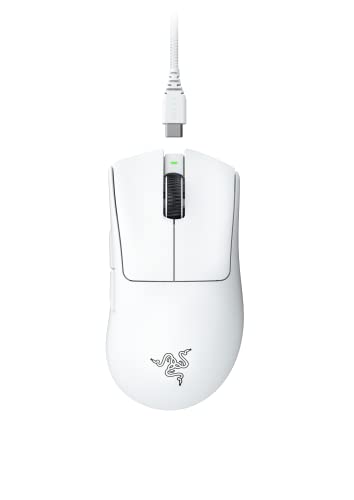
The best ergonomic shape, now ultralight. The DeathAdder is the most-loved right-handed shape in gaming, and the V3 Pro slims it to 63g while adding Razer's Focus Pro 30K sensor, Gen-3 optical switches and 90-hour battery. If the Superlight's flat shape doesn't fit your hand, this is the premium wireless answer.

Weight63g
ConnectionWireless
Max DPI30,000
Buttons5
  • Iconic ergonomic DeathAdder shape at just 63g
  • Focus Pro 30K optical sensor, up to 30,000 DPI
  • Gen-3 optical switches with 90M-click life
  • HyperSpeed wireless with ~90-hour battery
Best Flagship 10 / 10
Razer DeathAdder V4 Pro gaming mouse Razer

Razer DeathAdder V4 Pro

4.6 / 5 ₹15,999

The no-limits flagship. The V4 Pro takes the beloved DeathAdder ergonomics down to a staggering 56g, adds Razer's next-gen Focus Pro 45K sensor and 8,000 Hz HyperPolling wireless, and stretches battery life further still. It's overkill for most players — but if you want the absolute best right-handed wireless mouse, this is it.

Weight56g
ConnectionWireless
Max DPI45,000
Buttons5
  • Astonishing 56g with the full DeathAdder ergonomics
  • Focus Pro 45K sensor — up to 45,000 DPI
  • 8,000 Hz HyperPolling wireless for the lowest latency
  • Gen-4 optical switches and extended battery life

Before You Buy

What to Look For

Weight

Lighter is easier to flick and control. Under 70g is lightweight FPS territory; 80–100g suits slower games or a planted feel. Shape matters more than shaving a few grams.

Sensor Accuracy

Ignore the max-DPI headline — nobody games at 45,000 DPI. What counts is clean, consistent tracking with no spin-outs, smoothing or acceleration, which all ten picks deliver.

Shape & Grip

Match the shape to how you hold: ergonomic right-handed shells for palm grip, smaller flat shapes for claw and fingertip. The wrong shape ruins even the best sensor.

Wired vs Wireless

Modern 2.4GHz wireless (LIGHTSPEED, HyperSpeed) is lag-free and worth it above ~₹3,500. Wired saves money and never charges. Plain Bluetooth alone is too slow for gaming.

Switch Quality

Crisp, consistent clicks that don't develop double-click drift. Optical switches (Razer and others) can't wear into double-clicks; quality mechanical switches (Omron, TTC) still feel excellent.

Software & Memory

Good software (G HUB, Synapse, iCUE) sets DPI, buttons and RGB. On-board memory saves those settings to the mouse so they follow you to any PC without reinstalling software.

Explained

Types of gaming mice

Gaming mice split by connection (wired or 2.4GHz wireless), by weight and shell (lightweight or full-size), and by shape (ergonomic or ambidextrous, plus MMO multi-button designs). Here's how the main types compare so you can match one to your games and grip.

Wired mice

A cable means no charging and no latency worries, usually at a lower price. A flexible ‘paracord-style’ cable (Cobra, Model O) minimises drag. The value choice under about ₹2,500.

Wireless (2.4GHz)

A low-latency USB dongle (LIGHTSPEED, HyperSpeed) delivers wired-grade performance with no cable drag. The default for serious play above ₹3,500 — not to be confused with slower Bluetooth.

Lightweight / honeycomb

Drilled ‘honeycomb’ shells (Glorious Model O) or dense solid shells cut weight below 70g for effortless flicks. The go-to for fast FPS aim, at the cost of some heft and feel.

Ergonomic vs ambidextrous

Right-handed ergonomic shells (DeathAdder, Basilisk) cradle the palm; symmetrical ambidextrous shapes (Cobra, Superlight) suit fingertip/claw grip and left-handers. Pick by grip and hand size.

MMO / multi-button

Mice like the Basilisk V3 add extra thumb buttons and macro keys for MMO, MOBA and productivity. More versatile, but heavier — overkill for pure FPS players.

Grip styles

Palm grip rests the whole hand; claw arches the fingers for a mix of control and comfort; fingertip steers with just the fingertips for the fastest micro-adjustments. Your grip decides the ideal size and shape.

Under the Hood

How gaming mouse specs really work

Gaming mouse marketing loves big numbers, but only a few of them affect how the mouse actually feels. Here's what to weigh — and what to ignore.

Sensor & DPI

The sensor reads movement; the good ones (Logitech HERO, Razer Focus, Pixart 3395-class) track flawlessly. DPI is how many counts of movement the sensor reports per inch — higher just means the cursor moves further per hand movement, not ‘more accurate’. Most players sit at 800–1,600 DPI, so a 45,000 ceiling is marketing. What matters is no spin-outs, smoothing or acceleration, plus a high IPS (how fast a flick it can track).

Weight & shape

A lighter mouse is easier to flick and micro-adjust, which is why flagships now sit near 55–65g. Weight is cut with dense internals or a drilled ‘honeycomb’ shell. But shape matters just as much — an ergonomic right-handed shell suits palm grip, a smaller flat shape suits claw and fingertip. The perfect sensor in the wrong shape still feels bad.

Switches

The main buttons use mechanical switches (Omron, Kailh, TTC) or optical ones. Mechanical feel crisp but can develop double-click drift as contacts wear; optical switches actuate with light and are immune to that, which is why many gaming mice have moved to them. Both are rated for 60–90 million clicks.

Wireless & polling rate

Gaming wireless uses a dedicated 2.4GHz dongle (LIGHTSPEED, HyperSpeed) that is effectively as fast as a cable — not Bluetooth, which is fine as a backup but too laggy for play. Polling rate is how often the mouse reports position: 1,000 Hz (once per ms) is standard and plenty, while newer 8,000 Hz HyperPolling (DeathAdder V4 Pro) shaves latency further for competitive players with the monitor to match.

Our Recommendation

The best all-rounder is the
Logitech G304 Lightspeed

If we had to pick just one: the Logitech G304 Lightspeed at ₹2,395 offers the best balance of performance and price for most gamers — genuinely lag-free LIGHTSPEED wireless, the acclaimed HERO sensor, and months of battery from a single AA, all for a fraction of premium prices. But every mouse here wins its own category:

  • Tightest budget: Logitech G102 Lightsync — a reliable first mouse at ₹1,245
  • Lightest wired: Razer Cobra — 58g with optical switches
  • Best for MMO/customisation: Razer Basilisk V3 — 11 buttons
  • Best premium esports: Logitech G Pro X Superlight — the pros' choice
  • No-limits flagship: Razer DeathAdder V4 Pro — 56g, 8,000 Hz wireless
Buy Our Pick on Amazon

FAQ

Frequently Asked Questions

Wireless has won for most people. Modern 2.4GHz systems like Logitech LIGHTSPEED and Razer HyperSpeed are genuinely lag-free — pros use them at the top level — and they remove cable drag entirely. Wired is still a little cheaper and never needs charging, so for a tight budget the G102 or Razer Cobra are superb. Above ~₹3,500, go wireless. Note: Bluetooth alone is too slow for gaming; you want a 2.4GHz dongle.
Far less than the marketing suggests. Almost no one games above 3,200 DPI; a 45,000 DPI ceiling is a spec-sheet flex, not a feature you'll use. What matters is sensor accuracy — clean tracking with no spin-outs, smoothing or acceleration — which every pick here nails. Set 800–1,600 DPI and adjust in-game sensitivity to taste.
Lighter is easier to flick and micro-adjust, which is why the category shed weight so fast. Under 70g is considered lightweight and ideal for fast FPS aim (the Cobra, Model O, Superlight and DeathAdder V3/V4 Pro all qualify). Around 80–100g is fine for slower games, MMOs or if you prefer a planted feel — don't obsess over a few grams if the shape fits your hand.
Match the shape to your grip. Palm grippers (whole hand on the mouse) suit larger ergonomic shapes like the DeathAdder and Basilisk. Claw and fingertip grippers, who steer with the fingers, prefer smaller, flatter, lighter shapes like the Superlight or Model O. Right-handed ergonomic shapes are the most comfortable for most; symmetrical/ambidextrous shapes suit lefties and fingertip grip.
Optical switches (Razer, and increasingly others) actuate with a beam of light, so they physically can't develop the dreaded double-click drift that plagued older mechanical switches after a year or two. Mechanical switches still feel great and many top mice use quality ones (Omron, Kailh, TTC), but if longevity worries you, optical switches are the safer long-term bet.