Buying Guide

Best Ultrawide Monitors
2026 · Seven Picks, 29 to 49 Inches

An ultrawide replaces two monitors with one seamless screen. Seven picks from a ₹12,000 starter to Samsung’s 49-inch OLED, each weighed against its neighbour on width, speed, curve and price.

13 min read India 7 picks

Independent picks: no paid placements, no free review units. Amazon’s live stock check is paused, so these picks come from our own catalogue snapshot of 29 Oct–2 Nov 2026, when each was in stock; confirm stock on the listing. How we pick ↓

Alienware AW3426DWM 34-inch curved ultrawide, our pick of the best ultrawide monitors in India

Overview

One screen instead of two

An ultrawide monitor is roughly two monitors joined without the bezel down the middle. A 34-inch 21:9 screen at 3440×1440 has 34% more pixels than a 27-inch QHD monitor and the width to keep two full documents, a long video timeline or a racing game’s full field of view on screen at once. A 49-inch 32:9 model doubles that again.

Ultrawide prices in India have dropped sharply: a 34-inch 3440×1440 panel at 180Hz now costs ₹21,499. This guide runs from ₹12,000 to ₹86,999, and each review says what the next step buys. One gap to know about: in our catalogue snapshot nothing worth recommending sat between ₹36,000 and ₹82,000, so the ladder jumps from 34 to 49 inches. For standard 16:9 screens, see our best monitors guide; for coding-specific screens, monitors for work and coding.

A note on stock. Amazon’s live stock feed to us has been paused since 2 November. Every pick was in stock in our catalogue between 29 October and 2 November at the prices shown, and the LG 29WQ500 was already running low. Confirm stock on the listing; we will re-verify every pick when the feed returns.

Side-by-side

Ultrawide Monitor Comparison 2026

Scroll right on smaller screens to see all columns.

Monitor Price Size Resolution Refresh Curve Rating Buy
LG 29WQ500
LG 29WQ500
Cheapest
₹12,000 29"2560×1080100HzFlat 4.0 Amazon
Zebronics PA234
Zebronics PA234
Best Value
₹21,499 34"3440×1440180Hz1500R 4.2 Amazon
LG 34U601B
LG 34U601B
Best for Work
₹24,499 34"3440×1440120Hz1800R 4.3 Amazon
MSI MAG 342CQRF E20
MSI MAG 342CQRF E20
Best for Gaming
₹29,999 34"3440×1440200Hz1500R 4.4 Amazon
Alienware AW3426DWM
Alienware AW3426DWM
Best Overall
₹35,999 34"3440×1440240Hz1500R 4.6 Amazon
Samsung Odyssey G9
Samsung Odyssey G9
Widest Screen
₹82,799 49"5120×1440144Hz1000R 4.3 Amazon
Samsung OLED G9
Samsung OLED G9
Best Picture
₹86,999 49"5120×1440240Hz1800R 4.7 Amazon

In-Depth Reviews

Ultrawide Reviews — All 7 Picks

Each review says what you gain or give up against its neighbour.

Cheapest Ultrawide 01 / 7
LG 29WQ500 29-inch UltraWide Full HD IPS monitor LG

LG 29WQ500 29" UltraWide (100Hz)

4.0 / 5 ₹12,000

The cheapest way into 21:9: a flat IPS screen as tall as a 23-inch monitor but much wider, good for two documents or an editing timeline. The limits are height and sharpness, because it shows fewer rows than a 27-inch QHD screen. Stock was running low.

Size29"
Resolution2560×1080
Refresh100Hz
CurveFlat
  • 99% sRGB colour and HDR10 input on an IPS panel
  • Dual Controller software lets one mouse and keyboard run two PCs
  • OnScreen Control splits the screen into preset window layouts
Best Value 02 / 7
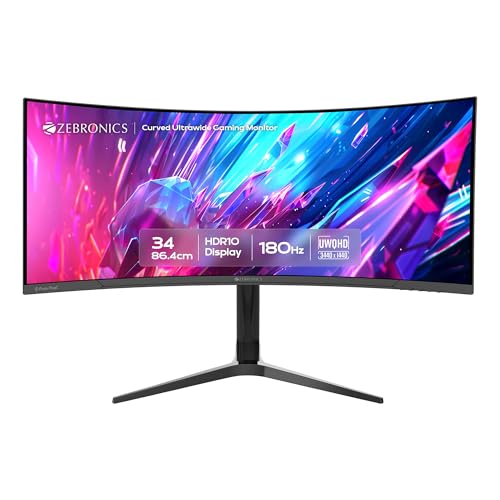
Zebronics PA234 34-inch curved ultrawide UWQHD gaming monitor Zebronics

Zebronics PA234 34" Ultrawide (180Hz)

4.2 / 5 ₹21,499

The cheapest full-size ultrawide here, with a spec sheet that is hard to argue with. ₹9,500 more than the LG 29WQ500 buys far more height and speed, plus a stand that adjusts height, swivel and pivot. The question is the brand: Zebronics’ service and panel consistency are less proven than LG’s or Dell’s.

Size34"
Resolution3440×1440
Refresh180Hz
Curve1500R
  • Two DisplayPort and two HDMI inputs for multiple sources
  • HDR10 input and 100% sRGB coverage on an anti-glare screen
  • 1ms MPRT response and Adaptive Sync for tear-free gaming
Best for Work 03 / 7
LG 34U601B 34-inch curved UltraWide WQHD monitor LG

LG 34U601B 34" Curved Ultrawide

4.3 / 5 ₹24,499

The ultrawide to buy for spreadsheets, code and editing. Against the Zebronics it costs ₹3,000 more and is slower, but brings LG’s service network and a gentler curve that keeps straight lines looking straight. Blacks are deep for films; the stand only tilts.

Size34"
Resolution3440×1440
Refresh120Hz
Curve1800R
  • VA panel with 3000:1 native contrast, three times typical IPS
  • 99% sRGB coverage and HDR10 input, with a flicker-safe backlight
  • HDMI and DisplayPort inputs; no USB-C is listed
Best for Gaming 04 / 7
MSI MAG 342CQRF E20 34-inch curved UWQHD gaming monitor MSI

MSI MAG 342CQRF E20 34" (200Hz)

4.4 / 5 ₹29,999

The fastest 34-inch ultrawide under ₹30,000. ₹5,500 more than the LG buys a much higher refresh rate on a Rapid VA panel tuned for quicker dark transitions, VA’s usual weak point. It suits racing and open-world games; for office work the LG is just as good.

Size34"
Resolution3440×1440
Refresh200Hz
Curve1500R
  • 0.5ms GtG response and AMD FreeSync Premium certification
  • 110% sRGB colour with 1.07 billion colours (8-bit + FRC)
  • 300 nits brightness, with Less Blue Light and anti-flicker modes
Best Overall 05 / 7
Alienware AW3426DWM 34-inch curved WQHD 240Hz monitor Alienware

Alienware AW3426DWM 34" (240Hz)

4.6 / 5 ₹35,999

The best all-round ultrawide here. ₹6,000 more than the MSI buys more speed, brighter HDR with Dolby Vision, a USB-C input and a stand that adjusts height and pivot. It is the one pick that works equally well for a laptop on the desk all day and for gaming at night.

Size34"
Resolution3440×1440
Refresh240Hz
Curve1500R
  • DisplayHDR 400 certified, with 400 nits and 3000:1 contrast
  • 95% DCI-P3 colour, the widest of the LCD picks here
  • AW Command Centre software for presets and firmware updates
Widest Screen 06 / 7
Samsung Odyssey G9 49-inch Dual QHD curved gaming monitor Samsung

Samsung Odyssey G9 49" (144Hz)

4.3 / 5 ₹82,799

Two 27-inch QHD monitors fused into one curved screen. Against the Alienware it more than doubles the price for a 32:9 view that wraps around your peripheral vision, which is superb in racing and flight sims and for traders. The tight curve takes getting used to, and many games letterbox.

Size49"
Resolution5120×1440
Refresh144Hz
Curve1000R
  • VESA DisplayHDR 600 and 2500:1 contrast for brighter HDR
  • Picture-by-Picture shows two PCs side by side on one screen
  • Height, tilt and swivel adjustable stand, and wall-mount compatible
Best Picture 07 / 7
Samsung Odyssey OLED G9 49-inch Dual QHD curved OLED gaming monitor Samsung

Samsung Odyssey OLED G9 49"

4.7 / 5 ₹86,999

The same 32:9 shape as the Odyssey G9 for ₹4,200 more, but with a QD-OLED panel: true black, near-instant pixel response and a gentler curve. Buy it if you were going to spend this much anyway. The costs of OLED are lower brightness and burn-in care with static desktop elements.

Size49"
Resolution5120×1440
Refresh240Hz
Curve1800R
  • Rated 250 nits typical with VESA DisplayHDR True Black 400
  • 0.03ms GtG response with 99% DCI-P3 colour coverage
  • OLED Safeguard features help limit burn-in from static elements

Before You Buy

6 Things to Check

21:9 or 32:9

21:9 (29–34 inches) is the practical choice: wide enough for two windows, fits a normal desk and most games support it. 32:9 (49 inches) equals two 27-inch monitors side by side; spectacular for sims and multitasking, but it needs a very wide desk and many games show black bars.

Vertical pixels matter as much as width

A 2560×1080 ultrawide is only as tall as a Full HD screen, so it shows fewer lines of a document than a 27-inch QHD monitor. 3440×1440 is the resolution to aim for: the height of QHD with a third more width.

Curve: smaller R means tighter

The number is the radius of the circle the screen follows, in millimetres. 1000R is tight and immersive for games; 1500R is the common middle; 1800R is gentle, better for spreadsheets and design, where straight lines should look straight.

Your graphics card needs more power

3440×1440 is 34% more pixels than QHD, and 5120×1440 is double QHD. A card that runs a game at 100fps in QHD will manage roughly 75fps at 3440×1440. Budget for the GPU, or plan on lower settings.

Measure the desk first

A 34-inch 21:9 monitor is about 80cm wide; a 49-inch 32:9 is about 120cm before the curve, and needs around 70cm of depth so you can see the edges without turning your head.

Consoles don’t output ultrawide

A PS5 or Xbox Series X sends a 16:9 picture, so on an ultrawide it shows with black bars down both sides. An ultrawide is a PC monitor first. If a console matters as much, a 16:9 screen is the better buy.

Explained

Types of Monitor

“Ultrawide” covers screens from a modest 29-inch flat panel to a 49-inch curve that wraps around you. These are the main types on sale in India.

21:9 flat, 2560×1080

29-inch entry ultrawides like the LG 29WQ500. Cheap and easy to fit, but only as tall as a 1080p screen, so they suit timelines and side-by-side windows more than long documents.

21:9 curved, 3440×1440

The mainstream 34-inch ultrawide: the height of a 27-inch QHD monitor with a third more width. Five of our seven picks are this type, from ₹21,499.

32:9 super-ultrawide

49-inch screens at 5120×1440, equal to two 27-inch QHD monitors side by side. They need a big desk and a strong GPU, and suit sims, traders and heavy multitaskers.

OLED ultrawide

QD-OLED ultrawides offer infinite contrast and near-instant response with a gentle curve. They cost the most and need burn-in care if you work with static windows all day.

The alternative: two monitors

Two 24- or 27-inch screens cost about the same as one ultrawide and give you a natural split, but with a bezel down the middle. Better if you want one screen in portrait for code or documents.

Under the Hood

How ultrawide monitors work

Ultrawides add two variables that standard monitors don’t have, aspect ratio and curvature, and change how you should think about resolution and graphics power.

Aspect ratio and how software handles it

Most PC games released in the last five years support 21:9 natively and show you more of the scene; some competitive titles cap the field of view, and a few older games stretch or letterbox. Video is usually 16:9, so films show black bars at the sides unless they were shot in a wide cinema format. Windows and macOS both handle ultrawide desktops well, and window-snapping tools make three-column layouts easy.

What the R in 1500R means

Curvature is quoted as the radius of the circle the screen would form if it kept curving, in millimetres. A 1500R screen follows a circle 1.5 metres in radius. The closer that radius matches your viewing distance, the more evenly your eyes see each edge. Tighter curves feel more immersive in games; gentler curves distort straight lines less in design work.

Why so many ultrawides use VA panels

VA panels are cheaper to make at large sizes and curve more easily, and their high contrast suits films and dark games. The trade-off is slower transitions from dark to bright, which shows as smearing behind fast-moving objects in dark scenes. Gaming-focused VA panels, like MSI’s Rapid VA, reduce it but don’t eliminate it; OLED removes it entirely.

Graphics power at ultrawide resolutions

Frame rate falls roughly in proportion to pixel count. 3440×1440 is 4.95 million pixels against 3.69 million for QHD, so expect about 25% lower frame rates than on a 27-inch QHD monitor in the same game. 5120×1440 is 7.37 million pixels, double QHD, and realistically needs an upper-tier graphics card for high settings at high refresh rates.

Our Method

How we pick & rank monitors

Every ultrawide here is ranked on five factors: vertical resolution (1440 rows beats 1080), curve and size against typical Indian desks, refresh rate and panel type, stand adjustment and ports including USB-C, and brand service, which matters more on a large, expensive panel. Each review compares the pick with its neighbour so you can see what the next step costs.

We do not run a display lab and have not measured these panels. Rankings combine the specification blocks on each Amazon.in listing, manufacturer data sheets, verified owner reviews and our own daily price log. Where a listing leaves out the panel type, we don’t guess it. Prices come from our catalogue snapshot of 29 October to 2 November 2026, while Amazon’s live stock feed to us is paused; every pick will be re-verified when it returns. Nopturnia earns an affiliate commission on qualifying purchases, which never changes a ranking, and we accept no free review units.

Our Recommendation

The best ultrawide for most people is the
Alienware AW3426DWM

At ₹35,999 it costs more than the LG and the MSI, but it is the only ultrawide here that does everything well: fast enough for any game a strong PC can run, bright enough for real HDR punch, USB-C for a work laptop and a stand that adjusts properly. If your budget stops at ₹25,000, the LG 34U601B is the sensible work choice. Every other pick wins its own job:

  • › Cheapest way in: LG 29WQ500 — 21:9 for ₹12,000, while stock lasts
  • › Best value 34-inch: Zebronics PA234 — 180Hz and a full stand for ₹21,499
  • › Best for work: LG 34U601B — gentle 1800R curve and LG service
  • › Best for gaming under ₹30k: MSI MAG 342CQRF E20 — 200Hz Rapid VA
  • › Widest screen: Samsung Odyssey G9 — 49 inches, DisplayHDR 600
  • › Best picture: Samsung Odyssey OLED G9 — QD-OLED at 49 inches
Buy Our Pick on Amazon

FAQ

Frequently Asked Questions

For games, video editing timelines and anything that benefits from one continuous image, yes: there is no bezel in the middle. Two monitors are better if you want one screen in portrait for code or documents, or want to move to a dual-screen setup gradually. A 34-inch 3440×1440 ultrawide has about the same working area as two 24-inch Full HD screens.
They work, but not in ultrawide. Consoles output a 16:9 picture, so it appears with black bars on both sides of a 21:9 or 32:9 screen. Some ultrawides can stretch the image, which looks distorted. If you play mostly on a console, buy a 16:9 monitor.
Plan for about 25% lower frame rates than at standard QHD. A mid-range card that runs a game at 100fps in QHD will deliver around 75fps at 3440×1440. For the 49-inch 5120×1440 models, expect roughly half your QHD frame rate. Our graphics card guide ranks current cards on value.
1500R is the safe middle for a 34-inch screen at a normal desk distance. 1000R is tighter and more immersive for games and suits 49-inch screens. 1800R is gentler and better if you do design, CAD or spreadsheet work, where curved straight lines can be distracting.
It is the cheapest way into 21:9, and it suits video timelines and side-by-side browsing. But it is only as tall as a Full HD screen, so documents and code show fewer lines than on a 27-inch QHD monitor. If you can stretch to a 34-inch 3440×1440 model, the extra height is worth it.
A 34-inch 21:9 monitor is about 80cm wide and fits most desks of 120cm or more. A 49-inch 32:9 monitor is about 120cm wide before the curve and needs a desk of 150cm or more, ideally 70cm deep. Check the stand’s footprint too; curved monitors often have wide feet.
They can, if the same bright elements stay on screen for hundreds of hours, such as a taskbar, docked windows or a game HUD. Samsung’s OLED G9 includes pixel-shift and refresh features to slow it, and habits help: auto-hide the taskbar and use dark themes. For eight hours a day of static office windows, an LCD ultrawide is the safer choice.

All the displays we track, in one place

Live prices, discounts and 90-day price history across the full catalogue — search it, filter it by price and spec, and save what you're watching.

Price lists: LG · Samsung · MSI · ZEBRONICS

Browse all displays