Touch itself is the cheap part — on the same Vivobook it adds ₹2,000. What you are really paying for is the hinge, the pen and the panel. Twelve in-stock machines on Amazon.in, from a ₹22,990 Chromebook to a ₹2.7 lakh creator tablet, sorted by how you will actually use the screen.
Almost every buying guide for this category treats “touchscreen” as a single feature. It is not. A touch panel on an ordinary laptop lets you tap a button or scroll a page; a 360° hinge turns the same laptop into a heavy tablet you can write on; a detachable gives you a real tablet that happens to dock to a keyboard. Those three machines suit different people, and a laptop that is excellent at one is usually mediocre at the others.
The market on Amazon.in in October 2026 is also oddly shaped. Below ₹1 lakh there are touch Chromebooks and exactly one Windows touch laptop that is not a grey import — the IdeaPad Flex and Pavilion x360 lines that used to fill the middle now appear only as imported listings at ₹1.5–2.5 lakh. Then, between ₹1,13,990 and ₹1,17,990, five strong machines land within ₹4,000 of each other. At that point the processor barely separates them; the screen, the pen in the box and the storage do.
So this guide ranks twelve laptops on how well they do the touch job they were built for, then on the panel you will stare at all day. If you never intend to touch the screen at all, our productivity laptop guide will get you more laptop per rupee; and if you mainly want something to read and draw on, a tablet with a keyboard case is often the better buy.
Side-by-side
Touchscreen Laptop Comparison 2026
Scroll right on smaller screens to see all columns.
The cheapest working touchscreen on Amazon.in, and only sensible if the job is a browser, Google Docs and Classroom. Touch makes ChromeOS feel like a big Android tablet with a proper keyboard attached. What you give up is sharpness and headroom — this is a homework machine, not a laptop to grow into.
TypeTouch clamshell
Screen14″ HD, 250 nits
PenNone
Weight1.35kg
Only 4GB of RAM, so busy tabs reload in the background
Runs Android apps from the Play Store alongside the browser
The 100GB Google One storage is free for the first year only
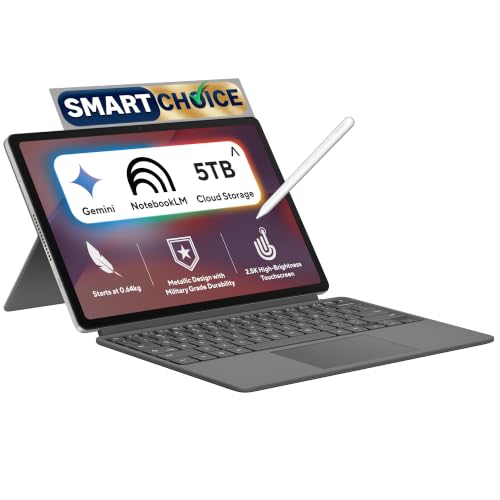
ASUS Chromebook CM32 Detachable (Kompanio 540, 8GB/128GB)
4.1 / 5₹39,990
The best-value pen device in this guide. Keyboard and stylus are both in the box, so the sticker is the whole price, and the tablet half is light enough to hold through a lecture. It is still ChromeOS on a phone-class chip: no Windows apps and nothing heavier than light photo edits.
TypeDetachable tablet
Screen12.1″ 2.5K, 120Hz
PenUSI 2.0, in the box
Weight0.61kg tablet
The 600-nit panel out-shines every other pick under ₹1 lakh
Magnetic stylus charges wirelessly while docked on the tablet’s edge
128GB of eMMC is slow storage; keep files in Google Drive
ASUS Vivobook 15 Touch (2026, Core 3 304, 8GB/512GB)
3.8 / 5₹60,990
The only Windows touchscreen under ₹1 lakh on Amazon.in that is not a grey import, and proof that touch itself is cheap: the non-touch version with the same chip and memory costs ₹2,000 less. Buy it for tapping and scrolling on a big screen, not for drawing — the hinge does not fold back.
TypeTouch clamshell
Screen15.6″ FHD, 250 nits
PenNone
Weight1.7kg
Core 3 304 has five cores: fine for Office, weak for editing
8GB of RAM is tight once Teams and a browser are open
A lifetime Office Home 2024 licence is bundled in the price
The convertible to buy if you keep a laptop for five years. It is the only 2-in-1 here whose memory and storage you can expand later, which outlasts any day-one spec. The trade is an IPS panel instead of OLED, and the heaviest tablet mode of the 14-inch flips.
Type360° convertible
Screen14″ WUXGA IPS, 400 nits
PenLenovo Pen 2, included
Weight1.54kg
Two SO-DIMM slots take up to 32GB of DDR5-5600 later
A second M.2 2242 slot leaves room for another SSD
The largest screen among the convertibles, for the price everyone else charges for a 14-inch, and the natural pick if you already carry a Galaxy phone. As a tablet it is too big to hold one-handed, so treat it as an easel for sketching and films rather than a reader.
Type360° convertible
Screen15.6″ FHD AMOLED, 500 nits
PenS Pen, included
Weight1.46kg
Galaxy phone owners get Quick Share, Phone Link and Multi Control
Bundles Office 2021, an older edition than rivals’ Office 2024
Dell 14 Plus 2-in-1 (Core Ultra 5 226V, 16GB/512GB)
4.0 / 5₹1,15,900
The pick for people whose eyes object to OLED. Its LCD avoids the low-brightness flicker some readers notice on OLED panels, and ComfortView Plus cuts blue light in hardware. Against the HP at almost the same price, though, it loses on screen sharpness, storage and weight.
Type360° convertible
Screen14″ FHD+ WVA, 300 nits
PenSold separately
Weight1.61kg
Half the HP’s storage, for a price just ₹90 lower
Backlit keyboard plus a fingerprint reader in the power button
Sold by a third-party seller, not Amazon’s usual Clicktech Retail
HP OmniBook X Flip OLED (Core Ultra 5 226V, 16GB/1TB)
4.6 / 5₹1,15,990
Our pick, because it pairs the best screen with the most storage at the price rivals charge for less. It is light enough to use as a tablet through a whole lecture, the pen is in the box, and Lunar Lake gives it genuine all-day battery without a charger in your bag.
Type360° convertible
Screen14″ 3K OLED, 120Hz
PenHP pen, included
Weight1.38kg
A 1TB SSD, double the IdeaPad, Dell and Yoga at this price
Refresh drops to 48Hz on static pages to save battery
16GB is soldered and permanent, with no larger option here
For people who want to poke the screen, not fold it. A conventional hinge keeps it lighter and stiffer than any convertible here, and the H-series chip makes it the fastest machine under ₹1.2 lakh for exports and builds. Drawing on it, though, means reaching across the keyboard.
TypeTouch clamshell
Screen14″ WUXGA OLED, 500 nits HDR
PenSupported, not included
Weight1.28kg
Core Ultra 5 225H has 14 cores against eight in Lunar Lake rivals
1TB SSD plus a lifetime Office Home 2024 licence
60Hz panel; scrolling looks less fluid than the HP’s 120Hz
The convertible we would choose for handwriting. It has the brightest OLED of the 14-inch flips, so it stays usable beside a window, and the bundled Yoga Pen feels closer to a real pen than most. You pay ₹14,000 more than the HP and get half its storage.
Type360° convertible
Screen14″ WUXGA OLED, 600 nits peak
PenYoga Pen, included
Weight1.38kg
One year of Accidental Damage Protection is bundled
Memory is soldered, but the M.2 slot takes a 1TB upgrade
Dolby Vision and DisplayHDR True Black 500 certified panel
Microsoft Surface Pro 13″ (12th Edition, Snapdragon X2 Plus, 16GB/512GB)
4.4 / 5₹1,69,990
The best Windows tablet you can buy, and the only pick here that is genuinely pleasant to hold for an hour. The catch is the bill: keyboard and pen are both extra, which pushes the real cost well above the sticker. On a lap, a kickstand is never as steady as a hinge.
TypeKickstand detachable
Screen13″ 2880×1920 LCD, 120Hz
PenSold separately
Weight0.9kg tablet
Snapdragon is Arm: some old printer drivers and anti-cheat games fail
Microsoft Surface Laptop 13.8″ (8th Edition, Snapdragon X2 Plus, 16GB/512GB)
4.3 / 5₹1,93,990
The best-made laptop in this guide, with a tall 3:2 screen that suits documents and a touchpad that sets the Windows standard. Touch here is a convenience, not a mode — it never folds. At this price, confirm your essential apps run on Arm before you commit.
TypeTouch clamshell
Screen13.8″ 2304×1536, 120Hz
PenNot included
Weight≈1.36kg
Microsoft claims 20 hours of battery, the longest figure here
600-nit panel at 201 pixels per inch, sharp for text
Costs ₹78,000 more than our top pick for half the storage
ASUS ProArt PZ14 (2026, Snapdragon X2 Elite, 32GB/1TB)
4.5 / 5₹2,69,990
A creator’s tablet first and a laptop second. Its OLED is the most colour-accurate, brightest and fastest-refreshing screen in this guide, and the top Snapdragon handles photo editing without strain. It is also the most expensive pick by a distance, and Arm still blocks some creative plug-ins.
TypeKickstand detachable
Screen14″ 3K OLED, 144Hz
PenStylus supported
Weight0.79kg tablet
1,000-nit HDR peak and full DCI-P3 coverage for colour work
Snapdragon X2 Elite: 18 cores and an 80 TOPS NPU
32GB of memory as standard, the most in this guide
If you only want to tap and scroll, a touch clamshell is lighter, stiffer and cheaper than a convertible. If you want to write or draw, you need a 360° hinge or a detachable — drawing on an upright laptop screen means reaching across the keyboard, and the panel wobbles under the pen. Getting this one decision right matters more than any processor choice.
02
Check whether a pen is actually in the box
Five picks here bundle a stylus — the ASUS CM32, IdeaPad 5 2-in-1, Galaxy Book5 360, OmniBook X Flip and Yoga 7 2-in-1. The Dell 14 Plus and both Surfaces make it a separate purchase, and the Surface Pro sells its keyboard separately too. A first-party pen typically adds several thousand rupees, so compare total prices, not stickers.
03
Brightness matters more on glossy touch glass
Every touchscreen uses glossy glass, and glass reflects. A 250–300 nit panel that looks fine on a matte laptop becomes hard to read under tube lights or near a window. Aim for 400 nits or more if you work anywhere bright; OLED panels also gain from deep blacks that keep contrast up when reflections wash out the image.
04
Judge the weight as a tablet, not as a laptop
A 1.4–1.6kg convertible is light for a laptop and heavy for a tablet — an iPad is under half that. For one-handed reading, only the detachables here (0.61–0.9kg without keyboard) are genuinely comfortable. Convertibles are best used as an easel on a desk or flat on your lap for writing.
05
Arm or x86 — check your apps first
Three picks run Qualcomm Snapdragon (Arm) chips. Windows translates most x86 software well now, and battery life is excellent, but some older printer and scanner drivers, VPN clients and anti-cheat games still fail. If one specific program is non-negotiable for your work or course, confirm it runs on Windows on Arm before buying.
06
Assume the memory is permanent
Nearly every thin convertible solders its RAM to the board, so the capacity you buy is the capacity you keep for the life of the laptop. 16GB is the sensible floor for Windows in 2026. The IdeaPad 5 2-in-1 is the lone exception here, with two SO-DIMM slots — its biggest advantage over rivals at the same price.
Explained
The five kinds of touchscreen laptop
Retail listings use “2-in-1”, “flip”, “360” and “convertible” almost interchangeably. There are really five designs with a touchscreen, and each trades weight, stiffness and price differently.
01
Touch clamshell
An ordinary laptop with a touch layer on the display. The hinge stops at around 135°, so it never becomes a tablet. Lightest and stiffest of the touch designs, and usually the cheapest way into touch — on the Vivobook 15 the premium is just ₹2,000. Best for tapping, pinch-zooming and scrolling; poor for handwriting. Our picks: Vivobook 15, Zenbook 14, Surface Laptop.
02
360° convertible
A full laptop with a hinge that folds the screen all the way back, giving laptop, tent, stand and tablet modes. You get a proper keyboard and a usable tablet in one device, at the cost of weight (1.4–1.6kg) and some screen wobble when you tap in laptop mode. The most popular design for students who take handwritten notes.
03
Kickstand detachable
A tablet with the whole computer behind the screen, a fold-out kickstand and a magnetic keyboard cover. The best tablet experience by far — under a kilogram — but the kickstand needs a desk-sized surface, and on a lap it is never as steady as a hinge. Keyboards are often sold separately. Surface Pro and ProArt PZ14 work this way.
04
Touch Chromebooks
ChromeOS laptops and detachables with touchscreens and Android app support. They run on phone-class chips with little RAM, which is fine for browser-based schoolwork and terrible for anything else, but the price is unmatched — our two picks cost ₹22,990 and ₹39,990, the latter with keyboard and stylus included.
05
Dual-screen laptops
Two touch OLED panels — one replaces the keyboard, which detaches. Spectacular for multitasking and genuinely useful for drawing, but on Amazon.in the current ASUS Zenbook Duo appears only as a ₹4.8 lakh import with a delivery date rather than stock, so we cannot recommend buying one there today.
Under the Hood
How touch, pens and panels actually work
Touch hardware is rarely explained on a spec sheet, yet it decides how the screen feels under a finger or a pen. Four mechanisms account for nearly every difference between these laptops.
How a laptop touchscreen senses your finger
Every pick here uses projected capacitive touch, the same technology as a phone: a fine grid of transparent electrodes measures the tiny change in capacitance your finger causes, which supports ten-point multi-touch. That grid is either bonded into the display stack or laminated to the cover glass — Lenovo’s “OGS” (one glass solution) puts it on the glass itself. Fewer layers means less parallax between your fingertip and the pixel it hits, and slightly less reflection.
Active pens: MPP, USI and why the brand matters
A finger is fine for buttons; writing needs an active pen, which the screen’s digitiser tracks for position, pressure and tilt. Windows laptops mostly use Microsoft Pen Protocol (MPP 2.0); Chromebooks use the USI 2.0 standard; Samsung’s S Pen and Apple’s Pencil use their own systems. A pen built for one protocol simply will not work on another, so a cheap “universal” stylus often behaves like a dumb rubber tip. When the pen is not bundled, buy the one the laptop maker names.
OLED versus LCD on a touchscreen
OLED makes the most of glossy touch glass: perfect blacks keep contrast high even when reflections wash over the panel. The caveat is dimming. Many OLED laptops dim with pulse-width modulation, flickering the panel on and off at low brightness, and a minority of people get eye strain from it. An LCD like the Dell’s avoids that, at the cost of contrast and colour. If OLED screens have bothered you before, that is a reason to pay the LCD’s trade-offs.
Why 360° hinges wobble, and refresh rate
A convertible’s hinge must hold the screen at any angle yet rotate fully, so it is tuned looser than a clamshell’s — tap hard in laptop mode and the panel bounces. Better hinges damp that in a fraction of a second; cheap ones keep swaying. Refresh rate matters more on touch than people expect: at 120Hz a page tracks your finger as you drag, while at 60Hz it lags visibly behind. Variable-refresh panels like the HP’s drop to 48Hz when the image is static to recover battery.
Our Method
How we rank touchscreen laptops
Every laptop here is scored on five factors, weighted in this order: how well the form factor does its touch job — tablet weight in grams, hinge steadiness, whether a pen is bundled and which protocol it uses; the panel, judged on brightness in nits, resolution, refresh rate in Hz and whether it is OLED or LCD; memory and storage, including whether either can be upgraded; battery and platform, separating Lunar Lake, H-series and Snapdragon chips; and total cost, counting any keyboard or pen sold separately. The first two carry the most weight, because they are what makes a touchscreen laptop worth buying over a cheaper non-touch one.
Rankings combine hands-on experience with these product families, manufacturer specifications and verified owner reviews. Every price and stock status was read from the live Amazon.in listing on the day of publication, and is rechecked at each update; listings that showed only a future delivery date were excluded. Nopturnia earns an affiliate commission on qualifying purchases, and it never changes where a laptop lands — our overall pick costs less than five of the other eleven and is beaten on price by the Dell sitting next to it.
Our Recommendation
The best touchscreen laptop for most people is the HP OmniBook X Flip OLED
At ₹1,15,990 it costs the same as the IdeaPad 5 2-in-1, Galaxy Book5 360 and Dell 14 Plus 2-in-1 to within ₹2,000, and it beats all three on the thing a touchscreen laptop is for: the screen. A 3K OLED at up to 120Hz is sharper and smoother than anything else in the bracket, the pen comes in the box, and its 1TB SSD is double what the Dell or the ₹14,000-dearer Yoga 7 ship with. At 1.38kg it is also among the lightest convertibles to hold as a tablet. Its one real compromise — 16GB of soldered memory — is shared by every Lunar Lake rival. Every other pick wins its own case:
› Handwritten notes: Lenovo Yoga 7 2-in-1 — the brightest 14-inch OLED flip and a better pen, for ₹1,29,990
› Keep it for years: Lenovo IdeaPad 5 2-in-1 — the only convertible with upgradeable RAM and a second SSD slot
› Biggest screen: Galaxy Book5 360 — a 15.6-inch AMOLED with the S Pen, ideal beside a Galaxy phone
› Touch without folding: Zenbook 14 OLED — the lightest and fastest machine under ₹1.2 lakh
› A real tablet: Surface Pro 13″ — 0.9kg, but budget extra for the keyboard and pen
› Creative work: ASUS ProArt PZ14 — a 1,000-nit 3K OLED tablet with 32GB of memory
› Tight budget: ASUS CM32 Detachable — tablet, keyboard and stylus for ₹39,990
For most people it is a small convenience rather than a reason to buy: tapping a dialog box, pinch-zooming a PDF or scrolling while you lean back. It becomes genuinely worth paying for when you want to write or draw, and then you need a convertible or detachable plus an active pen, not just a touch panel. On a basic clamshell the premium can be tiny — the touch Vivobook 15 costs ₹2,000 more than the non-touch version with the same chip, memory and storage.
Slightly. The touch digitiser draws a little power even when idle, and touch models usually have glossy glass that tempts you to raise the brightness to beat reflections. In practice the processor and panel matter far more: a Lunar Lake or Snapdragon convertible with a touchscreen will outlast most older non-touch laptops comfortably. If battery is the priority, choose the efficient chip first and worry about touch second.
A 2-in-1 convertible keeps its keyboard attached and folds the screen back through 360 degrees, so it is always a complete laptop but a heavy tablet at around 1.4–1.6kg. A detachable puts the whole computer behind the screen and docks to a keyboard cover, so the tablet weighs under a kilogram but needs a kickstand or stand to work as a laptop, and is less steady on your lap.
No. A cheap passive stylus works like a finger, with no pressure sensitivity or palm rejection. For proper writing you need an active pen that speaks the same protocol as the laptop's digitiser — usually Microsoft Pen Protocol on Windows, USI 2.0 on Chromebooks, or the maker's own system such as Samsung's S Pen. Buy the pen the laptop maker recommends, or one of the five picks here that bundle it.
For school and many college courses that live in Google Classroom, Docs and the browser, yes — and the ASUS CM32 Detachable is a remarkable deal at ₹39,990 with keyboard and stylus included. It cannot run Windows software, so check whether your course needs specific desktop programs such as MATLAB, AutoCAD or Tally before choosing ChromeOS. Engineering and design students should look at the Windows picks.
Mostly. Windows 11 on Arm runs native apps at full speed and translates most ordinary x86 programs well, and Office, browsers, Zoom and Adobe's main apps are native. The problems are niche but real: some printer and scanner drivers, certain VPN and security clients, and online games with kernel-level anti-cheat. If one program is essential to you, search for its Windows on Arm support before buying a Surface or the ProArt PZ14.
Fingerprints, yes — glossy touch glass shows smudges quickly, and a microfibre cloth becomes part of your kit. Scratches are less of a worry: several picks use toughened glass such as Corning Gorilla Glass, and an active pen's tip is softer than the screen. A matte screen protector reduces glare and smudges, but it slightly dulls an OLED and can change how the pen feels.
There are only three serious options in stock: the HP Chromebook 14 at ₹22,990, the ASUS CM32 Detachable at ₹39,990, and the ASUS Vivobook 15 Touch at ₹60,990. For browser-based work the CM32 is the best of them, because it includes a keyboard and stylus. If you need Windows, the Vivobook 15 is the only non-import choice, but it is a clamshell, so you cannot fold it into a tablet.
Every laptop we track, in one place
Live prices, discounts and 90-day price history across the full catalogue — search it, filter it by price and spec, and save what you’re watching.




 HP
HP