
Buying Guide

Best Monitors Under ₹10,000
2026 · Seven Picks for Work & Play

Under ₹10,000 you now get 200Hz gaming panels, IPS colour and even a stand that rotates. Seven picks from ₹6,349 to ₹9,799, each written against the one before it, so you know exactly what each extra rupee buys.

12 min read India 7 picks

Independent picks: no paid placements, no free review units. Amazon’s live stock check is paused, so these picks come from our own catalogue snapshot of 29 Oct–2 Nov 2026, when each was in stock; confirm stock on the listing. How we pick ↓

LG UltraGear 24GS65F, our pick of the best monitors under ₹10,000 in India

Overview

What ₹10,000 buys in a monitor now

Two years ago, ₹10,000 bought a 60Hz office screen. In late 2026 the same money buys a 24-inch IPS panel at 180–200Hz, and in one case a stand that raises, lowers and turns to portrait. Every pick in this guide is Full HD, because QHD starts just above this budget (the LG 24U631A at ₹10,999 is the first), so the decisions here are about size, refresh rate, panel type and stand.

The seven picks run in price order from ₹6,349 to ₹9,799, and each review says what you gain over the cheaper one before it. If you can stretch past ₹10,000, our best monitors guide continues the ladder up to QD-OLED, and the gaming monitors guide covers every budget for players.

A note on stock. Amazon’s live stock feed to us has been paused since 2 November. Every pick here was in stock in our catalogue between 29 October and 2 November, at the prices shown. Budget monitors sell out and reprice often, so confirm on the listing; we will re-verify every pick as soon as the feed returns.

Side-by-side

Monitors Under ₹10,000 Compared

Scroll right on smaller screens to see all columns.

Monitor Price Size Resolution Refresh Panel Rating Buy
Dell SE2225HM
Dell SE2225HM
Cheapest
₹6,349 21.5"1920×1080100HzVA 4.1 Amazon
ViewSonic VA240A-H
ViewSonic VA240A-H
Best Value
₹6,699 24"1920×1080120HzIPS 4.2 Amazon
MSI MAG 255F E20
MSI MAG 255F E20
Best for Gaming
₹8,599 24.5"1920×1080200HzRapid IPS 4.4 Amazon
Lenovo LOQ 24-10
Lenovo LOQ 24-10
PC + Console
₹8,799 23.8"1920×1080200HzIPS 4.4 Amazon
ViewSonic VA270A-H
ViewSonic VA270A-H
Biggest Screen
₹9,290 27"1920×1080120HzIPS 4.0 Amazon
HP OMEN 24
HP OMEN 24
Best Stand
₹9,299 23.8"1920×1080165HzIPS 4.5 Amazon
LG 24GS65F
LG 24GS65F
Our Pick
₹9,799 23.8"1920×1080180HzIPS 4.6 Amazon

In-Depth Reviews

Monitor Reviews — All 7 Picks

Each review says what you gain or give up against its neighbour.

Cheapest 01 / 7
Dell SE2225HM 21.5-inch Full HD VA 100Hz monitor Dell

Dell SE2225HM 21.5" (100Hz VA)

4.1 / 5 ₹6,349

The cheapest monitor worth buying here, and the right size for a small desk or a second screen. Its VA panel has two to three times the contrast of the IPS picks, so films look deeper. You give up viewing angles and space: side-by-side windows feel cramped at this size.

Size21.5"
Resolution1920×1080
Refresh100Hz
PanelVA
  • HDMI, DisplayPort 1.2 and VGA, so even old PCs connect
  • TÜV three-star eye-comfort rating with always-on ComfortView Plus
  • Tilt-only stand and 250 nits brightness for indoor use
Best 24-inch Value 02 / 7
ViewSonic VA240A-H 24-inch Full HD IPS 120Hz monitor ViewSonic

ViewSonic VA240A-H 24" (120Hz IPS)

4.2 / 5 ₹6,699

Only ₹350 more than the Dell buys a bigger screen, an IPS panel with wider viewing angles and a faster refresh rate. That makes it the better everyday monitor for most desks. What you lose against the Dell is contrast, so dark films look greyer, and DisplayPort.

Size24"
Resolution1920×1080
Refresh120Hz
PanelIPS
  • 104% sRGB coverage, plenty for office work and streaming
  • 1500:1 contrast, better than most budget IPS panels
  • 250 nits brightness, suited to indoor rooms
Best for Gaming 03 / 7
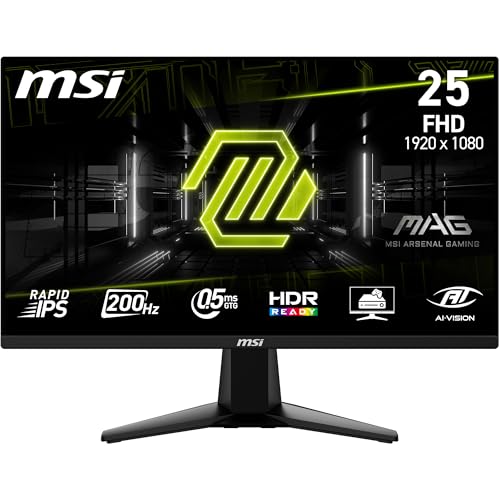
MSI MAG 255F E20 24.5-inch Full HD Rapid IPS 200Hz gaming monitor MSI

MSI MAG 255F E20 24.5" (200Hz)

4.4 / 5 ₹8,599

The jump to real gaming speed. ₹1,900 more than the ViewSonic buys a fast IPS panel that makes shooters and racing games far smoother, if your PC can hold the frame rate. It is still Full HD, so text looks no sharper than on the cheaper picks.

Size24.5"
Resolution1920×1080
Refresh200Hz
PanelRapid IPS
  • 300 nits and 100% sRGB, a step up on the cheaper pair
  • AMD FreeSync Premium certified, so frame drops don’t tear the image
  • HDMI 2.0b and DisplayPort 1.2a inputs for PC and console
Best for Consoles 04 / 7
Lenovo LOQ 24-10 23.8-inch Full HD IPS 200Hz gaming monitor Lenovo

Lenovo LOQ 24-10 23.8" (200Hz)

4.4 / 5 ₹8,799

Nearly identical speed to the MSI for ₹200 more, so choose on ports. The Lenovo has two HDMI inputs plus DisplayPort 1.4, which lets a PS5 and a PC stay plugged in together, and 99% sRGB colour. Like the MSI, its stand only tilts.

Size23.8"
Resolution1920×1080
Refresh200Hz
PanelIPS
  • HDMI 2.1 TMDS means console 120Hz at 1080p, not 4K at 120Hz
  • 300 nits brightness and an anti-glare coating for lit rooms
  • 0.5ms MPRT response with four adjustable overdrive levels
Biggest Screen 05 / 7
ViewSonic VA270A-H 27-inch Full HD IPS 120Hz monitor ViewSonic

ViewSonic VA270A-H 27" (120Hz IPS)

4.0 / 5 ₹9,290

The only 27-inch screen under ₹10,000 we would recommend, for people who sit further back or watch more than they read. Against the Lenovo it trades gaming speed for size. The catch is sharpness: Full HD stretched this large shows visibly soft text at desk distance.

Size27"
Resolution1920×1080
Refresh120Hz
PanelIPS
  • Same 1500:1 contrast and 104% sRGB as the 24-inch model
  • HDMI and VGA only, so no DisplayPort for a gaming PC
  • 250 nits brightness, so keep it away from direct sunlight
Best Stand 06 / 7
HP OMEN 24 23.8-inch Full HD IPS 165Hz gaming monitor HP

HP OMEN 24 23.8" (165Hz)

4.5 / 5 ₹9,299

The cheapest monitor here with a stand that raises, lowers and rotates to portrait, which you will appreciate more over a year of daily use than extra hertz. For ₹9 more than the 27-inch ViewSonic you give up size but gain a properly adjustable, gaming-capable screen.

Size23.8"
Resolution1920×1080
Refresh165Hz
PanelIPS
  • 99% sRGB and 90% DCI-P3, the widest colour in this guide
  • 300 nits brightness with an anti-glare, three-sided borderless screen
  • AMD FreeSync Premium and 1ms GtG response with overdrive
Our Pick 07 / 7
LG UltraGear 24GS65F 23.8-inch Full HD IPS 180Hz gaming monitor LG

LG UltraGear 24GS65F 23.8" (180Hz)

4.6 / 5 ₹9,799

Our pick under ₹10,000. Against the HP OMEN it adds ₹500 for a faster refresh rate, NVIDIA G-SYNC Compatible certification and LG’s wider service network. It is the one monitor here that suits gaming, work and a long stay on the desk equally well. Watch the price, which sits close to ₹10,000.

Size23.8"
Resolution1920×1080
Refresh180Hz
PanelIPS
  • Tilt, height and pivot adjustment included, so no arm needed
  • 300 nits, 1000:1 contrast and HDR10 input with anti-glare
  • DisplayPort and HDMI inputs; no USB-C or speakers listed

Before You Buy

6 Things to Check

24 inches is the Full HD sweet spot

Every pick here is 1920×1080. At 21.5–24 inches that gives 92–102 pixels per inch, which looks sharp enough at a normal distance. At 27 inches it drops to 82 PPI and text looks soft. Buy 27-inch Full HD only if you sit further back.

100Hz for work, 165–200Hz for games

Any refresh rate above 60Hz makes scrolling smoother, so the 100–120Hz picks are already an upgrade for office use. Gamers should aim for 165–200Hz, but only if the PC can produce those frame rates; an integrated-graphics laptop cannot.

IPS for colour, VA for contrast

IPS panels show accurate colour from any angle and handle fast motion well. The Dell’s VA panel has much deeper blacks, which suits films in a dark room, but colours shift when viewed from the side.

Check your PC’s ports first

Older office PCs often only have VGA; gaming PCs want DisplayPort; laptops usually have HDMI. Two of these monitors skip DisplayPort entirely. Match the monitor to the ports you already have, and use the cable in the box rather than an adapter.

A good stand beats extra hertz

Most monitors under ₹10,000 only tilt. The HP OMEN 24 and LG 24GS65F also raise, lower and pivot, which helps posture over long days. Otherwise check for VESA mount holes so an arm can raise the screen later.

Warranty and service matter at this price

Budget monitors do develop dead pixels and backlight faults. Check the warranty length on the listing, whether it covers dead pixels, and whether the brand has a service centre near you. Dell, HP, Lenovo and LG all have wide service networks in India.

Explained

Types of Monitor

Under ₹10,000, nearly every monitor is Full HD, so the real choices are panel type, size and speed. These are the variants you will meet in the listings.

Standard IPS office monitors

60–120Hz, accurate colour, wide viewing angles. The ViewSonic VA240A-H and VA270A-H are the value end. Ideal for work, study and streaming.

Fast IPS gaming monitors

Marketed as Rapid IPS or Fast IPS, at 165–200Hz with overdrive modes. The MSI, Lenovo, HP and LG picks fall here. They still make good work screens.

VA monitors

Higher contrast, deeper blacks, narrower viewing angles and slower dark transitions. Common in budget curved monitors and very good for films.

Eye-care monitors

Flicker-free backlights and low blue light modes, often TÜV-certified. Almost every monitor now has these; the certification is a tie-breaker, not a reason to buy.

Portable monitors

USB-C-powered 15–16-inch screens for laptops on the move. They start around ₹10,000 but are too small for a main desk monitor.

Under the Hood

Three numbers on every budget monitor listing

Budget listings lean on big numbers. Here is what refresh rate, response time and eye-care labels really mean, and which ones to ignore.

Refresh rate is not frame rate

A 200Hz monitor can show 200 new images a second, but only if your PC sends them. If your graphics card manages 70 frames per second in a game, a 200Hz monitor shows 70. Adaptive sync (AMD FreeSync or NVIDIA G-SYNC Compatible) matches the screen to the PC so uneven frame rates don’t tear the image, which is why it matters more than the top refresh number on a budget PC.

Response time figures are not comparable

Listings quote 0.5ms, 1ms or 5ms, but in different units. GtG measures how fast a pixel changes colour; MPRT measures perceived blur and is usually achieved with backlight strobing that dims the screen. A 0.5ms MPRT monitor is not ten times faster than a 5ms GtG one. Refresh rate and panel type tell you more.

Flicker-free and low blue light

Cheap backlights dim by pulsing on and off (PWM), which some people notice as eye strain. Flicker-free monitors dim with steady current instead. Low blue light modes warm the colour; TÜV Rheinland certifications test both. Every pick here claims flicker-free operation.

Our Method

How we pick & rank monitors

Every monitor here is ranked on five factors: what each extra rupee buys over the cheaper pick, pixel density at its size, refresh rate and panel type, stand adjustment and ports, and brand service in India. Under ₹10,000 the differences are small, so we weight everyday comfort, the stand and the right ports, as heavily as speed.

We do not run a display lab and have not measured these panels. Rankings combine the specification blocks on each Amazon.in listing, manufacturer data sheets, verified owner reviews and our own daily price log. Prices come from our catalogue snapshot of 29 October to 2 November 2026, while Amazon’s live stock feed to us is paused; every pick will be re-verified when it returns. Nopturnia earns an affiliate commission on qualifying purchases, which never changes a ranking, and we accept no free review units.

Our Recommendation

The best monitor under ₹10,000 is the
LG UltraGear 24GS65F

At ₹9,799 it is the most expensive pick here, and the HP OMEN 24 does most of the same job for ₹500 less. The LG earns the spot with its faster panel, G-SYNC Compatible certification and LG’s service network, while keeping a stand that adjusts height and rotates. If your budget is firmly under ₹10,000, buy it while the price holds. Every other pick wins its own job:

  • › Lowest price: Dell SE2225HM — ₹6,349, with the best contrast here
  • › Best everyday 24-inch: ViewSonic VA240A-H — IPS at 120Hz for ₹6,699
  • › Best for gaming: MSI MAG 255F E20 — 200Hz for ₹8,599
  • › PC plus console: Lenovo LOQ 24-10 — two HDMI inputs
  • › Biggest screen: ViewSonic VA270A-H — 27 inches for ₹9,290
  • › Best stand for less: HP OMEN 24 — height and pivot for ₹9,299
Buy Our Pick on Amazon

FAQ

Frequently Asked Questions

Yes. The MSI MAG 255F E20 and Lenovo LOQ 24-10 run at 200Hz for under ₹9,000, and the LG 24GS65F adds a height-adjustable stand at 180Hz. All three are Full HD, which is the right resolution for a mid-range graphics card. Just make sure your PC can produce high frame rates; otherwise a cheaper 100–120Hz monitor looks the same.
Only if you sit a little further back than usual or mostly watch video. At 27 inches, Full HD gives about 82 pixels per inch, and text looks noticeably soft at a normal desk distance. For reading and work, a 24-inch Full HD screen or a QHD monitor just above this budget is the better buy.
IPS for most people: better colour, wider viewing angles and cleaner motion in games. VA, like the Dell SE2225HM, has two to three times the contrast, so it suits films and dark rooms, but colours shift at an angle and dark scenes smear more in fast games.
Yes, over HDMI. Under ₹10,000 every pick is Full HD, so a PS5 runs at 1080p, and the higher-refresh models accept the console’s 120Hz mode in games that support it. The Lenovo LOQ 24-10 is the best fit because its two HDMI inputs let a PC and a console stay connected together.
No. Built-in monitor speakers are thin and quiet, and most of the picks here don’t list any. A cheap pair of desktop speakers or headphones sounds far better. If you want one cable, check that the monitor has a headphone output to pass audio from HDMI.
If you mostly read, write or code, yes. The LG 24U631A at ₹10,999 is QHD on a 24-inch screen, which makes text dramatically crisper than any monitor in this guide. If you mostly game on a mid-range PC, Full HD at 165–200Hz is the better use of the money.
Display full-screen solid colours (black, white, red, green and blue) and look closely for dots that stay lit or stay dark. Free online dead-pixel tests do this in a browser. Check within the return window, because many warranties only replace a panel above a set number of dead pixels.

All the displays we track, in one place

Live prices, discounts and 90-day price history across the full catalogue — search it, filter it by price and spec, and save what you're watching.

Price lists: Dell · HP · LG · Lenovo · MSI

Browse all displays