Buying Guide

Best WiFi Routers & Mesh
For Gaming · WiFi 6 & 7 — India 2026

Your free ISP router is the bottleneck. From a ₹2,799 gigabit upgrade to WiFi 7 gaming routers and whole-home mesh — eleven picks across TP-Link, ASUS, D-Link and ROG, ranked by latency, QoS and real coverage.

Nopturnia Editorial
11 min read India 11 picks
Best WiFi Routers and Mesh Systems for Gaming in India 2026

Overview

Your free ISP router is costing you games

Most Indian homes run entirely on the router the broadband provider left behind — and it shows the moment a match starts. ISP boxes ship with weak CPUs that buckle when the family streams, no QoS to stop a 4K video doubling your ping, single-band radios drowning in neighbourhood interference, and dead zones one wall away. The result is the lag spike you blame on the game server.

This guide ranks eleven upgrades from a ₹2,799 gigabit workhorse to WiFi 7 gaming routers and whole-home mesh — each one a real improvement in latency, stability or coverage. Pair one with our best gaming controllers or a gaming laptop and the whole chain gets faster.

Our Method

How we test & rank routers

Every router here is scored on the five factors that decide how gaming actually feels: latency under load (does ping hold steady while others stream — the single biggest ISP-router failure), real wireless throughput at range (through Indian brick walls, not lab distances), coverage and roaming (single-unit reach, mesh hand-off smoothness and backhaul quality), wired capability (gigabit versus 2.5G/10G multi-gig ports, dedicated gaming ports), and features per rupee — QoS quality, security included free versus sold as a subscription, and mesh expandability.

Our rankings combine hands-on impressions, manufacturer specifications, independent benchmark data and thousands of verified owner reviews. We recheck pricing and availability at each update. Nopturnia earns an affiliate commission on qualifying purchases, but that never changes where a router lands in these rankings.

Side-by-side

Router & Mesh Comparison 2026

Stable low latency beats headline speed for gaming. Scroll right on small screens.

Router Price Wi-Fi Type Key Ports Rating Buy
TP-Link Archer C6
TP-Link Archer C6
Best ISP-Router Upgrade
₹2,799 Wi-Fi 5 AC1200 Router 5× Gigabit 4.3 Amazon
TP-Link Archer AX10
TP-Link Archer AX10
Best Budget WiFi 6
₹4,399 Wi-Fi 6 AX1500 Router 4× Gigabit 4.3 Amazon
D-Link M30 EAGLE PRO AI
Best Value AX3000
₹4,499 Wi-Fi 6 AX3000 Router Gigabit 4.3 Amazon
ASUS RT-AX53U
ASUS RT-AX53U
Best Budget All-Rounder
₹4,999 Wi-Fi 6 AX1800 Router Gigabit + USB 4.4 Amazon
TP-Link Deco X20 (2-pack)
Best Budget Mesh
₹11,399 Wi-Fi 6 AX1800 Mesh (2-pack) Gigabit 4.5 Amazon
TP-Link Archer GE400
Best Value Gaming (WiFi 7)
₹16,999 Wi-Fi 7 BE6500 Gaming router 2× 2.5G 4.6 Amazon
TP-Link Deco X50 (3-pack)
Best Whole-Home Mesh
₹20,499 Wi-Fi 6 AX3000 Mesh (3-pack) Gigabit 4.5 Amazon
ASUS RT-AX86U Pro
ASUS RT-AX86U Pro
Best Gaming Overall
₹26,044 Wi-Fi 6 AX5700 Gaming router 2.5G + gaming LAN 4.7 Amazon
TP-Link Deco BE25 (3-pack)
Best WiFi 7 Mesh
₹31,999 Wi-Fi 7 BE5000 Mesh (3-pack) 2× 2.5G per unit 4.6 Amazon
ASUS ROG Rapture GT-AX11000 Pro
Best Gaming Flagship
₹49,999 Wi-Fi 6 AX11000 tri-band Gaming router 10G + 2.5G 4.6 Amazon
ASUS ZenWiFi XT8 (2-pack)
Best Premium Mesh
₹54,999 Wi-Fi 6 AX6600 tri-band Mesh (2-pack) 2.5G WAN 4.5 Amazon

Deep Reviews

The 11 Picks — Detailed

Click Amazon to check the latest price.

Best ISP-Router Upgrade 01 / 11
TP-Link Archer C6 wifi router TP-Link

TP-Link Archer C6

4.3 / 5 ₹2,799

The cheapest upgrade that actually feels like one. The Archer C6 replaces your ISP box’s weak radio with four antennas plus beamforming, adds five full gigabit ports and MU-MIMO, and stops the nightly “restart the router” ritual. On fiber plans up to 100 Mbps it delivers everything you’re paying for — something most bundled routers quietly fail to do.

Wi-Fi5 (AC1200)
Ports5× Gigabit
MU-MIMOYes + beamforming
Best forPlans ≤100 Mbps
  • Five full gigabit ports — wired gaming ready
  • Four antennas + beamforming beat any ISP box
  • MU-MIMO serves multiple devices without queuing
  • Access-point mode works alongside your ISP router
Best Budget WiFi 6 02 / 11
TP-Link Archer AX10 wifi router TP-Link

TP-Link Archer AX10

4.3 / 5 ₹4,399

WiFi 6 for the price of a dinner out. The Archer AX10’s triple-core 1.5GHz CPU keeps latency steady when the whole family is online — the exact scenario where ISP routers choke mid-match — and OFDMA handles many devices talking at once. At 51% off MRP it’s the default answer to “cheapest real gaming upgrade”.

Wi-Fi6 (AX1500)
CPUTriple-core 1.5GHz
Ports4× Gigabit
OFDMAYes
  • True WiFi 6 with OFDMA under ₹4,500
  • Triple-core CPU holds latency steady under load
  • Gigabit WAN + LAN for full fiber speeds
  • 51% off MRP — outstanding entry price
Best Budget All-Rounder 04 / 11
ASUS RT-AX53U wifi router ASUS

ASUS RT-AX53U

4.4 / 5 ₹4,999

The budget router that grows with you. Beyond solid AX1800 WiFi 6, the RT-AX53U brings two things rivals charge subscriptions for: lifetime-free AiProtection network security (Trend Micro), and AiMesh — buy any second ASUS router later and they merge into a proper mesh. Add adaptive QoS with a gaming preset and it’s the smartest ₹5,000 in Indian networking.

Wi-Fi6 (AX1800)
SecurityAiProtection, free
MeshAiMesh-ready
QoSAdaptive + gaming
  • Lifetime-free AiProtection — no subscription traps
  • AiMesh: pair with any ASUS router into a mesh later
  • Adaptive QoS with one-tap gaming priority
  • Subscription-free parental controls included
Best Budget Mesh 05 / 11
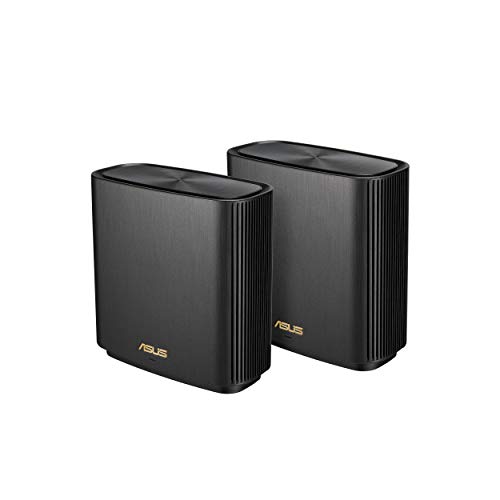
TP-Link Deco X20 (2-pack) wifi router TP-Link

TP-Link Deco X20 (2-pack)

4.5 / 5 ₹11,399

Dead zones end here. Two Deco X20 units blanket a duplex or large 3BHK in one seamless WiFi 6 network — one name, one password, automatic hand-off as you walk — so your match doesn’t stutter when you move to the balcony. Setup is a five-minute app affair, and at 48% off MRP it’s the cheapest credible mesh in India.

Wi-Fi6 (AX1800)
Units2 (expandable)
RoamingOne seamless SSID
SetupDeco app, 5 min
  • Two units cover a duplex or large 3BHK
  • Seamless roaming — no more dead-zone drops
  • Expandable: add more Decos any time
  • 48% off MRP — India’s cheapest credible mesh
Best Value Gaming (WiFi 7) 06 / 11
TP-Link Archer GE400 wifi router TP-Link

TP-Link Archer GE400

4.6 / 5 ₹16,999

Our overall winner. The GE400 is a genuine WiFi 7 gaming router — BE6500 speeds, Multi-Link Operation for rock-steady latency, dual 2.5G multi-gig ports and a dedicated game panel with QoS that spots and prioritises game traffic — at a price that undercuts WiFi 6 gaming routers from two years ago. This is the sensible “buy once for the decade” pick.

Wi-Fi7 (BE6500)
Ports2× 2.5G multi-gig
GamingGame panel + QoS
MLOYes
  • WiFi 7 MLO uses two bands at once for stable pings
  • Dual 2.5G ports — multi-gig wired gaming
  • Game panel detects and prioritises game traffic
  • Undercuts older WiFi 6 gaming routers at ₹16,999
Best Whole-Home Mesh 07 / 11
TP-Link Deco X50 (3-pack) wifi router TP-Link

TP-Link Deco X50 (3-pack)

4.5 / 5 ₹20,499

Three AX3000 units, up to 6,500 sq ft — this is the mesh for villas, three-floor homes and offices. The X50 steps up to faster WiFi 6 per node than the X20, keeps gigabit ports on every unit for wired consoles and TVs, and its AI-driven mesh quietly steers each device to the best node. At 46% off MRP, whole-home coverage has never been this cheap per square foot.

Wi-Fi6 (AX3000)
Units3
CoverageUp to 6,500 sq ft
SteeringAI-driven mesh
  • Covers villas and multi-floor homes (6,500 sq ft)
  • Gigabit ports on every node for wired consoles
  • AI mesh steers devices to the strongest unit
  • 46% off MRP — huge coverage per rupee
Best Gaming Overall 08 / 11
ASUS RT-AX86U Pro wifi router ASUS

ASUS RT-AX86U Pro

4.7 / 5 ₹26,044

The gaming router enthusiasts actually recommend to each other. The RT-AX86U Pro pairs AX5700 WiFi 6 with a 2.5G port, a dedicated gaming LAN port that always gets top priority, Mobile Game Mode for phone gamers, and open NAT for consoles — plus ASUS’s free AiProtection and AiMesh. Years after launch it remains the benchmark that new gaming routers get measured against.

Wi-Fi6 (AX5700)
Ports2.5G + gaming LAN
GamingMobile Game Mode, Open NAT
MeshAiMesh-ready
  • Dedicated gaming port — whatever plugs in goes first
  • Mobile Game Mode cuts latency for phone gaming
  • Open NAT + port forwarding presets for consoles
  • Free lifetime AiProtection; grows via AiMesh
Best WiFi 7 Mesh 09 / 11
TP-Link Deco BE25 (3-pack) wifi router TP-Link

TP-Link Deco BE25 (3-pack)

4.6 / 5 ₹31,999

WiFi 7 across the whole house. Three BE5000 Deco units bring Multi-Link Operation to mesh — each device can hold both bands simultaneously, so hand-offs and interference stop showing up as lag spikes — with 2.5G multi-gig ports on every node. For large homes on gigabit fiber that want to be done upgrading until the 2030s, this is the one.

Wi-Fi7 (BE5000)
Units3
Ports2× 2.5G per unit
MLOYes
  • WiFi 7 MLO mesh — lag-spike-free roaming
  • 2.5G multi-gig ports on every single node
  • 8K streaming and gigabit-fiber ready
  • 30% off MRP for a three-unit WiFi 7 system
Best Gaming Flagship 10 / 11
ASUS ROG Rapture GT-AX11000 Pro wifi router ASUS ROG

ASUS ROG Rapture GT-AX11000 Pro

4.6 / 5 ₹49,999

The most router most gamers will ever see. Tri-band AX11000 WiFi 6 gives games their own untouched 5GHz band, a 10G port plus 2.5G port handle any wired setup imaginable, and ROG’s triple-level game acceleration prioritises your packets on the device, the router and the route out. Overkill by design — and 19% off its ₹62,000 MRP right now.

Wi-Fi6 tri-band (AX11000)
Ports10G + 2.5G
GamingTriple acceleration
CPUQuad-core 2.0GHz
  • Dedicated third band just for your gaming devices
  • 10G + 2.5G ports — beyond-fiber wired headroom
  • Triple-level game acceleration, ROG dashboard
  • AiMesh, free AiProtection, quad-core muscle
Best Premium Mesh 11 / 11
ASUS ZenWiFi XT8 (2-pack) wifi router ASUS

ASUS ZenWiFi XT8 (2-pack)

4.5 / 5 ₹54,999

Mesh without the mesh penalty. The ZenWiFi XT8’s tri-band design reserves an entire 5GHz band as a dedicated wireless backhaul between its two units, so the speed at the far node stays close to the speed at the router — the weakness of every dual-band mesh. AX6600 throughput, a 2.5G WAN port, free AiProtection and gaming QoS make it the no-compromise whole-home pick.

Wi-Fi6 tri-band (AX6600)
Units2
BackhaulDedicated 5GHz band
Ports2.5G WAN
  • Dedicated backhaul band — no far-node speed loss
  • Covers up to 5,500 sq ft with two units
  • 2.5G WAN + gigabit LAN on both units
  • Free AiProtection and adaptive gaming QoS

Before You Buy

What to Look For

Match Your Plan

A ₹50,000 router won't speed up a 100 Mbps plan. Up to 100 Mbps, any pick here is plenty; 300 Mbps–1 Gbps wants AX3000+; above that, look for 2.5G ports and WiFi 7.

WiFi Standard

WiFi 6 is the 2026 baseline — OFDMA handles busy homes far better than the WiFi 4/5 in ISP boxes. WiFi 7 adds MLO for latency stability and is worth it if you're buying for the next 5+ years.

QoS & Game Modes

The feature that actually fixes lag at home. Good QoS (ASUS adaptive QoS, TP-Link game panel, D-Link AI) keeps your ping flat while others stream. On ISP routers this simply doesn't exist.

Ports Matter

Ethernet is still the lowest-latency link, so port quality counts: gigabit minimum, 2.5G on the gaming picks, 10G on the ROG. A dedicated gaming port (RT-AX86U Pro) auto-prioritises whatever you plug in.

Router or Mesh?

Count walls and floors, not square feet. One good router covers a 2–3BHK; multiple floors or concrete dead zones need mesh. For gaming, prefer tri-band or wired backhaul so far nodes don't halve their speed.

Subscription Traps

Security and parental-control suites are increasingly paywalled. ASUS's AiProtection is free for life; TP-Link's free HomeShield tier covers basics. Factor the yearly fee into any "cheap" router's real price.

Explained

Types of routers & mesh systems

Home networking gear splits into five tiers — from the ISP box you already have to WiFi 7 flagships. Here's what each type actually does, and who should buy it.

ISP / bundled routers

The free box from Jio, Airtel or ACT. Fine for browsing; built to a cost for everything else — weak radios, no QoS, congested 2.4GHz. If gaming matters, this is what you're upgrading away from.

Budget upgrade routers

₹2,500–5,000 buys gigabit ports, real antennas and WiFi 6 (Archer C6/AX10, D-Link M30, RT-AX53U). The biggest jump-per-rupee in this guide — most homes should simply start here.

Gaming routers

Strong CPUs, game-aware QoS, multi-gig and dedicated gaming ports, open-NAT tools (GE400, RT-AX86U Pro, ROG). Built to keep latency flat when the household is busy — the gamer's category.

Mesh systems

Multiple units, one seamless network (Deco X20/X50/BE25, ZenWiFi). The only real fix for multi-floor homes and dead zones. Premium tri-band models add a dedicated backhaul so far nodes stay fast.

WiFi 7 (BE-class)

The new standard: MLO bonds two bands per device for stability, 4K-QAM lifts throughput, and multi-gig ports come standard (GE400, Deco BE25). Buy it for longevity and latency, not for headline Gbps.

Enthusiast flagships

Tri-band radios, 10G ports, quad-core CPUs and dashboards for everything (GT-AX11000 Pro, ZenWiFi XT8). For gigabit-fiber homes, streamers and anyone who refuses to think about WiFi again for a decade.

Under the Hood

How router specs really work

Router boxes shout numbers — AX5700! BE6500! 11000 Mbps! — that no single device will ever see. Here's what the jargon actually means for your ping.

WiFi 5 → 6 → 7, in one paragraph each

WiFi 5 (AC) is the old guard — fast enough for streaming, but it serves devices one at a time, so busy homes queue. WiFi 6 (AX) changed the game with OFDMA: the router talks to many devices in the same transmission, which is why it feels dramatically smoother in a family home even at the same speed rating. WiFi 7 (BE) adds MLO (Multi-Link Operation) — one device holds 2.4GHz and 5GHz simultaneously, so when one band hiccups, your packets take the other. That's a latency-stability feature aimed squarely at gaming.

The AX/BE number game

The number after the standard (AX1500, AX3000, BE6500) is the router's combined theoretical speed across all bands — a marketing total no single device can use. It's still useful as a class indicator: within a brand, a higher number means better radios and usually a stronger CPU. Rule of thumb: AX1500–1800 for plans up to ~300 Mbps, AX3000+ for 500 Mbps–1 Gbps, WiFi 7 or tri-band beyond that.

Latency, QoS and bufferbloat

Gaming needs almost no bandwidth — a match uses less than 1 Mbps — but it is merciless about latency. The killer is bufferbloat: when someone saturates the connection (4K stream, big download), a cheap router queues everything, and your 30ms ping becomes 200ms. QoS (Quality of Service) fixes this by recognising game traffic and letting it jump the queue — ASUS's adaptive QoS, TP-Link's game panel and D-Link's AI engine all do versions of this. It's the single most valuable gaming feature on this page, and ISP routers don't have it.

Bands, backhaul and multi-gig ports

2.4GHz travels far but is slow and congested; 5GHz is the gaming band — fast and clean but shorter-ranged. Tri-band routers add a second 5GHz radio: flagships dedicate it to gaming devices (ROG), and premium meshes use it as a dedicated backhaul so the far node doesn't halve its speed relaying your traffic (ZenWiFi XT8). On wires, 2.5G/10G multi-gig ports matter once fiber crosses 500 Mbps — and even on slower plans, ethernet remains the lowest-latency connection you can give a console or PC.

Our Recommendation

The best all-rounder is the
TP-Link Archer GE400

If we had to pick just one: the Archer GE400 at ₹16,999 is the router we'd put in most gaming homes — genuine WiFi 7 with MLO for stable pings, dual 2.5G ports, a real gaming QoS panel, and enough headroom to outlive several fiber upgrades. But every pick here wins its own scenario:

  • First upgrade from the ISP box: Archer AX10 or ASUS RT-AX53U — under ₹5,000
  • Spec bargain: D-Link M30 — AX3000 at ₹4,499
  • Dead zones on a budget: Deco X20 2-pack, or X50 3-pack for villas
  • Enthusiast gaming: ASUS RT-AX86U Pro — the community benchmark
  • WiFi 7 whole-home: Deco BE25 3-pack with MLO
  • Money no object: ROG GT-AX11000 Pro, or ZenWiFi XT8 for mesh
Buy Our Pick on Amazon

FAQ

Frequently Asked Questions

Yes — and it is often the cleanest path. If your connection is plain fiber-to-ethernet, put the new router in charge and switch the ISP box to bridge mode (or just use the new router’s WAN port behind it). If your ISP box is also your fiber modem (ONT), run the new router in its default router mode and enable bridge/passthrough on the ISP unit to avoid "double NAT", which adds latency and breaks open NAT on consoles. Every router in this list also supports access-point mode if you only want better WiFi coverage.
Count walls, not square feet. A good single router (M30, RT-AX86U Pro) covers a typical 2-3BHK apartment. If you have multiple floors, a duplex layout, or concrete walls creating dead zones, no single router fixes that — you need mesh (Deco X20/X50/BE25, ZenWiFi XT8). For gaming specifically, prefer a wired or dedicated-backhaul mesh: budget dual-band meshes halve their speed at the far node because the same radio talks to both you and the main unit.
For raw speed, no — WiFi 6 already outruns your plan. What WiFi 7 adds for gamers is Multi-Link Operation (MLO): your device holds connections on two bands simultaneously, so interference on one band no longer causes the ping spike you feel as a stutter. That stability, plus buy-once longevity into the 2030s, is why the GE400 and Deco BE25 make sense even on mid-tier plans. On a tight budget, WiFi 6 with good QoS remains excellent for gaming.
In order of impact: (1) Ethernet — any wired connection beats any wireless one, which is why gaming routers add 2.5G and dedicated gaming ports; (2) QoS/game prioritisation — stops your ping doubling when someone starts a 4K stream (the ISP-router killer); (3) a router CPU that doesn’t choke under load; (4) clean spectrum — 5GHz over 2.4GHz, or WiFi 7 MLO. Note: nothing in your house lowers the base latency to the game server — that’s distance and your ISP — but a good router stops adding latency on top of it.
Usually not — because ASUS gives theirs away. AiProtection (Trend Micro network-level security and parental controls) is free for life on every ASUS router here, which is a genuine hidden saving of ₹3,000–6,000 a year versus paid tiers like TP-Link HomeShield Pro or Netgear Armor. TP-Link’s free HomeShield tier covers the basics (QoS, scans, basic parental controls) and is fine for most homes; just don’t feel pressured into the subscription.