Best PC Tower Cabinets in India 2026 Edition · ₹2,759 to ₹20,649
Your cabinet decides how cool, how quiet and how upgradeable your build is. Eight mid-tower and E-ATX cases ranked on airflow, GPU clearance, radiator support and build quality — from a ₹2,759 first-build chassis to a full custom-loop showcase.
The cheapest part that decides your build's temperature
A cabinet is the one component people buy last and regret first. It has no clock speed and no benchmark score, but it sets the ceiling on everything else: how much air reaches your graphics card, whether a 360 mm radiator will physically fit, how long a GPU you can drop in two years from now, and how loud the whole machine is at 11 pm. A sealed glass-front case can run a hot CPU and GPU 10–15°C warmer than a mesh-front one with the identical hardware inside.
India's case market in 2026 splits cleanly. Below ₹4,000 you are choosing between domestic brands — Ant Esports, Circle, Zebronics, Frontech — where the trade-off is thin steel and cheap fans in exchange for a lot of RGB. From roughly ₹5,000 the global names arrive: Antec, MSI, Cooler Master, Montech, Corsair and Lian Li, with real airflow engineering, proper cable channels and fans you will not want to replace on day one. We have picked eight cases across that whole spread, and every one of them takes a 240 mm radiator or larger.
Building the rest of the machine too? Pair your cabinet with one of our best gaming monitors picks — the display is where the frames your new build produces actually pay off.
Our Method
How we test & rank PC cabinets
Every cabinet here is scored on the five things that decide how a build actually lives: front-panel airflow (mesh versus sealed glass, and how much open area the intake really has), maximum GPU length in mm, radiator and fan mounting (how many 360 mm positions and at what memory-clearance cost), build quality — steel gauge, panel fit, tool-less latches and cable-routing depth — and value, which we read as what you get before you have to buy extra fans. Thermals and noise carry more weight than lighting, because a case you can hear from across the room is one you stop enjoying quickly.
Our rankings combine hands-on impressions, manufacturer specification sheets and thousands of verified owner reviews across Indian marketplaces. We recheck pricing and stock at every update, and we only list cases we would put our own components into. Nopturnia earns an affiliate commission on qualifying purchases, but that never changes where a cabinet lands in these rankings. Prices below are indicative and were verified at publication.
Side-by-side
PC Cabinet Comparison 2026
Scroll right on smaller screens to see all columns.
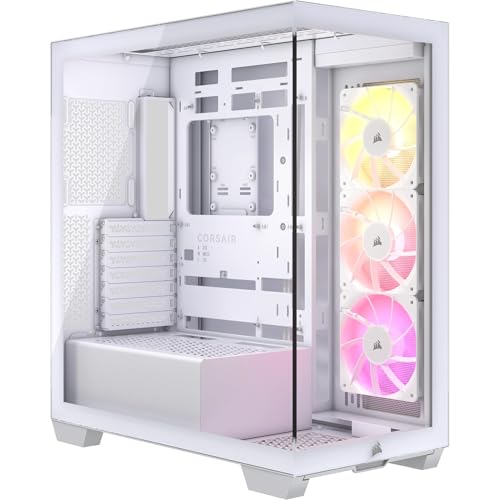
The default answer for a first build on a tight budget. Four 120 mm rainbow fans arrive pre-installed — three intake, one exhaust — so you get a working airflow path without spending another rupee, and the tempered glass side panel means the RGB is actually visible. The 300 mm GPU limit is the real constraint: fine for a dual-fan RTX 4060 or RX 7600, too short for a triple-fan card.
Form FactorMid-Tower ATX
Fans Included4 × 120mm Rainbow
Max GPU300mm
CPU Cooler160mm
Four fans in the box — nothing else to buy on day one
Takes ATX, Micro-ATX and Mini-ITX boards, so it fits any budget platform
Measure your card first — triple-fan GPUs will not clear 300mm
The cheapest case here we would recommend without a caveat. The high-airflow mesh front is genuinely open rather than decorative, three 120 mm ARGB fans come pre-installed, and the 420 mm GPU allowance is longer than cases costing twice as much — it will swallow any consumer graphics card on sale. A 360 mm top radiator mount means you can add an AIO later instead of rebuying the cabinet.
Form FactorMid-Tower ATX
Fans Included3 × 120mm ARGB
Max GPU420mm
Radiator360mm Top
Fine-mesh front panel runs a hot GPU markedly cooler than sealed glass
Room for up to ten 120mm fans as you expand the build
170mm CPU cooler clearance takes most tall air towers
MSI's sub-₹7,000 airflow case, and the most expandable chassis in the budget half of this list — it accepts up to eleven 120 mm fans across front, top, rear and floor. Four ARGB fans ship in the box on a 1-to-6 control board, so you can sync lighting without a motherboard header to spare. Magnetic dust filters on the intakes are a genuinely useful touch in dusty Indian cities.
Form FactorMid-Tower ATX
Fans Included4 × 120mm ARGB
Max GPU390mm
Radiator360mm Top
Supports up to eleven 120mm fans — the most mounting points under ₹7,000
Built-in 1-to-6 ARGB control board works without motherboard headers
Magnetic dust filters lift off for cleaning without opening the case
The safest ₹7,000 purchase in the Indian market and the case most system integrators reach for by default. Three CF120 ARGB fans feed a fine-mesh front, a PWM and ARGB hub is bundled so lighting and speed control work out of the box, and the removable top panel makes fitting a 240 mm AIO far less painful than it usually is. Front USB Type-C at this price is still unusual.
Form FactorMid-Tower ATX
Fans Included3 × CF120 ARGB
Max GPU410mm
Radiator360mm Front
PWM and ARGB hub included — no splitter or controller to buy
Removable top panel makes top-mounting an AIO a two-minute job
Front USB Type-C connector, rare in this price band
Montech built the AIR 903 MAX around one idea: move as much air as possible with as few fans as possible. Four 140 mm PWM fans — three ARGB intakes plus a rear exhaust — shift meaningfully more air per revolution than the 120 mm sets rivals ship, which means lower RPM and less noise for the same temperature. Combined with 400 mm of GPU room, 180 mm of cooler height and full E-ATX support, it is the pick for an overclocked, high-wattage build.
Form FactorE-ATX Mid-Tower
Fans Included4 × 140mm PWM
Max GPU400mm
CPU Cooler180mm
140mm fans move more air at lower RPM — cooler and quieter than 120mm sets
360mm radiator support at both the front and the top
Front USB Type-C plus two USB 3.0 and a dedicated LED button
A dual-chamber layout hides the power supply, drive cages and every cable behind the motherboard tray, leaving a clean two-sided panoramic glass view of just the board and GPU. It is also one of the few cases at this price ready for reverse-connector motherboards (ASUS BTF, MSI Project Zero), so a genuinely cable-free build is possible. Three RS120 ARGB fans are included and it takes two 360 mm radiators.
Form FactorMid-Tower ATX
Fans Included3 × RS120 ARGB
Max GPU410mm
Radiator2 × 360mm
Dual-chamber design hides the PSU and every cable from view
Compatible with reverse-connector boards for a cable-free front
Room for up to ten 120mm fans, or 360mm radiators top and side
Our overall pick, and the case that quietly beats far pricier chassis on thermals. The trick is the fans: two oversized 160 mm ARGB intakes at the front instead of the usual three 120s, moving a large volume of air at low, quiet RPM through all-around mesh panels. Add a rear PCIe fan bracket that blows directly onto the back of the graphics card, 392 mm of GPU clearance, relocatable front I/O, and Lian Li's usual excellent panel fit and cable channels.
Form FactorE-ATX Mid-Tower
Fans Included2 × 160mm + 1 × 140mm
Max GPU392mm
Radiator360mm Front/Top
Two 160mm ARGB intakes deliver high airflow at unusually low noise
Rear PCIe fan bracket cools the back of the GPU directly
Front I/O with USB Type-C, relocatable to the lower front panel
The reference showcase chassis, and the one you buy if the build itself is the point. Aluminium and glass construction, a reversible layout that lets you put the motherboard on either side, dual ARGB strips along the top and bottom edges, and mounting for three radiators at once — 420 mm top plus 360 mm side and bottom — which is why custom-loop builders default to it. Note that it ships with no fans, so budget for six to nine on top of the case price.
Form FactorE-ATX Dual-Chamber
Fans IncludedNone (ARGB strips)
Max GPU455mm
Radiator420mm Top
Three simultaneous radiator mounts — the default custom-loop chassis
Aluminium and tempered glass build with a reversible motherboard layout
Ships without fans — factor another ₹4,000–8,000 into the build
The single biggest thermal decision. A fine-mesh intake can run the same hardware 10–15°C cooler than a sealed tempered-glass front. If you want a glass front, make sure the case pulls air from the side or floor instead.
02
Max GPU Length (mm)
Look up your card's length before you buy anything. Modern triple-fan cards run 320–360 mm; a 300 mm case limit rules most of them out. Leave 20 mm of slack for the power connector.
03
Radiator & AIO Support
Even if you are on air cooling today, buy a case that takes a 240 mm radiator at minimum, 360 mm ideally. Check where it mounts too — a top-mounted 360 often eats RAM clearance above 45 mm.
04
CPU Cooler Height
Tall air towers like the Noctua NH-D15 or Deepcool AK620 need roughly 160–170 mm of clearance. Anything below 155 mm limits you to low-profile coolers or an AIO. Every pick here clears 160 mm.
05
Front I/O & Type-C
A front USB Type-C header is the difference between reaching behind the desk and not. Confirm your motherboard has the matching internal USB 3.2 Gen 2 header — budget B-series boards often skip it.
06
Bundled Fans & Hub
Read the fan count as part of the price. A ₹5,000 case with four ARGB fans and a hub can undercut a ₹9,000 case that ships bare once you have bought six fans and a controller for it.
Explained
Types of PC cabinets
"Cabinet" covers everything from a shoebox that hides under a monitor to a full custom-loop showcase. What separates them is three things: the largest motherboard they accept, their internal layout (single or dual chamber), and how the front panel handles airflow. Here are the categories you are actually choosing between.
01
Mid-tower (ATX)
The default and by far the most common. Takes a full ATX board, a 360 mm radiator and any consumer GPU, while still fitting on or under a normal desk. Unless you have a specific reason not to, buy one of these.
02
Mini-tower (Micro-ATX / ITX)
Smaller footprint for M-ATX or Mini-ITX boards. Cheaper and desk-friendly, but expect shorter GPU limits, less cable room and often only 240 mm radiator support. Best for office builds and entry-level gaming rigs.
03
Full-tower / E-ATX
Built for E-ATX or workstation boards, multiple radiators and long drive arrays. Heavy and expensive, and overkill for a single-GPU gaming PC — worth it for HEDT builds, heavy storage or custom water cooling.
04
Dual-chamber showcase
Splits the interior in two: components on show behind glass, power supply and cables hidden in a rear compartment. Cleanest possible look and excellent radiator mounting, at a premium in both price and desk depth.
05
Mesh airflow cases
A perforated or fine-mesh front prioritises temperature over silence and looks. These are the coolest-running cases at any price and the right default for a gaming build with a hot GPU.
06
Panoramic / curved glass
Wraps a single pane of tempered glass around the front-left corner for an uninterrupted view. Gorgeous, but airflow has to come from the side, top or floor — check the intake path before you commit.
Under the Hood
How cabinet airflow actually works
A cabinet does not cool anything on its own. What it does is control the path air takes across your components, and how much of it gets there. Once you understand that path, most of the spec sheet stops being marketing and starts being useful.
Airflow paths and positive pressure
Cool air should enter low at the front and leave high at the rear and top, because heat rises. The standard arrangement is three front intakes and one rear exhaust. Running slightly more intake than exhaust creates positive pressure, which pushes dust out through the case seams instead of sucking it in through them — a meaningful difference over a year in an Indian city. Negative pressure cools marginally better on paper but fills the case with dust.
Static pressure vs airflow fans
Fans are tuned for one of two jobs. Airflow fans move a lot of air through open space and belong on a mesh front panel. Static-pressure fans push air through resistance — radiator fins, dense dust filters, restrictive panels — and belong on an AIO. Fitting an airflow fan to a radiator wastes most of its rating. Fan size matters too: a 140 mm fan moves more air per revolution than a 120 mm one, so it hits the same temperature at a lower, quieter RPM.
Radiator placement
A radiator mounted at the front as intake gives the coolest liquid temperature but dumps that heat into the case, warming the GPU. Mounted at the top as exhaust it runs the CPU a few degrees warmer while keeping the rest of the build cooler. Also keep the pump below the top of the radiator so air collects away from it — a pump running dry is the usual cause of AIO gurgle.
Reading a case spec sheet
Four numbers do most of the work: maximum GPU length, maximum CPU cooler height, radiator support by position, and PSU length. Watch for asterisks — manufacturers routinely quote the GPU limit without a front radiator installed, and the top radiator limit without accounting for tall RAM. Check the two numbers you actually need together, not separately.
Our Recommendation
The best all-rounder is the Lian Li Lancool 216 RGB
If we had to pick just one: the Lancool 216 RGB at ₹10,919 delivers the best thermals-per-rupee of anything here. The two 160 mm ARGB intakes move serious air at low RPM, the rear PCIe bracket cools the GPU directly, and 392 mm of clearance means it will outlive two graphics card upgrades. But every cabinet in this guide wins its own category:
› Tightest budget: Ant Esports Elite 1100 — four fans and tempered glass at ₹2,759
› Best budget airflow: Antec CX300 ARGB — real mesh front and 420mm GPU room
› Most expandable under ₹7,000: MSI MAG Forge 320R — eleven fan mounts, ARGB hub included
A useful rule is 5–8% of the total build budget. On a ₹60,000 machine that is roughly ₹3,000–5,500, where the Ant Esports Elite 1100 and Antec CX300 ARGB sit. On a ₹1.5 lakh build, ₹8,000–12,000 buys the Montech AIR 903 MAX, Corsair 3500X or Lancool 216 and is money well spent — the cabinet is the one part you keep across two or three upgrade cycles.
Yes, and the gap is large. With identical hardware and identical fans, a fine-mesh intake typically runs a CPU and GPU around 10–15°C cooler than a sealed tempered-glass front that can only draw air through narrow side slits. If you want the glass look without the penalty, choose a panoramic case that intakes from the side or floor, and check that those intake positions actually come populated with fans.
Three is the practical minimum: two front intakes and one rear exhaust. Four — three intake, one exhaust — is the sweet spot for a gaming build and is what most cases in this guide ship with. Beyond six you get rapidly diminishing returns and more noise. Keep intake count equal to or slightly above exhaust so the case runs at positive pressure and pushes dust out rather than pulling it in.
Almost certainly, but check the number rather than assuming. Most triple-fan partner cards in that class measure 300–340 mm, and every case here except the Ant Esports Elite 1100 (300 mm) clears 390 mm or more. The catch is that manufacturers usually quote GPU length without a front-mounted radiator — fit a 360 mm AIO up front and you can lose 30–60 mm of that clearance.
A mid-tower takes ATX, Micro-ATX and Mini-ITX boards, one or two radiators, and fits under a desk — it covers virtually every gaming and productivity build. A full-tower is taller and deeper, supports E-ATX and workstation boards, three or more radiators and large drive arrays. For a single-GPU gaming PC a full-tower buys you nothing but weight and desk space; it earns its place for custom water loops or heavy storage.
Not today, but it is cheap insurance. A 360 mm mount is also three 120 mm fan positions, so it improves airflow even with an air cooler, and it leaves the door open to an AIO in two years without replacing the cabinet. Since a case outlasts most other components, buying one that only takes 240 mm is a limit you will eventually run into.
They are fine for an entry-level build, with real caveats. Brands like Ant Esports, Ant Value, Circle and Zebronics give you tempered glass and three or four RGB fans for the price of one good fan, which is genuinely hard to argue with. What you give up is steel thickness (thin panels flex and ring), fan bearing quality and noise, cable-routing depth, and GPU clearance — often only 300 mm. If your GPU is a dual-fan card and the machine sits under a desk, that trade-off is reasonable.
They divide by size and by layout. By size: mini-tower for Micro-ATX and Mini-ITX, mid-tower for ATX (the default), and full-tower for E-ATX and workstation boards. By layout: single-chamber, or dual-chamber showcase cases that hide the power supply and cables behind the motherboard tray. By front panel: mesh airflow, solid tempered glass, or panoramic curved glass. See the Types of PC cabinets section above for the full breakdown.
Front-mounted as intake gives the lowest CPU temperature, because the radiator sees cool room air first — but it dumps that heat inside the case and warms the GPU. Top-mounted as exhaust runs the CPU a few degrees warmer and keeps everything else cooler, which is the better balance for most gaming builds. Whichever you choose, mount the pump below the highest point of the radiator so trapped air does not collect in it.




 Ant Esports